Image SEO is much more than adding a keyword to an ALT field. Images can improve a page by explaining complex ideas, showing products or services, supporting written content and making an article easier to understand. Poorly handled images, however, can slow a website, create accessibility problems and make it harder for search engines to understand what the image represents.
The right approach is not to hide important marketing messages inside graphics. Essential information should remain available as readable HTML text, while images should complement that information with useful visual context.
Google can discover and understand images using several signals, including the image itself, its alternative text, filename, surrounding content and the page where it appears.
This guide explains how to optimize images for Google Search, Google Images, website performance and accessibility without keyword stuffing or outdated SEO tricks.
What Is Image SEO?
Image SEO is the process of making website images useful to visitors, understandable to search engines and efficient to load.
It includes several areas:
- choosing relevant images;
- using descriptive alternative text;
- using meaningful filenames;
- placing images near relevant content;
- selecting efficient image formats;
- compressing oversized files;
- serving responsive image sizes;
- making images accessible to search crawlers;
- preventing unnecessary layout shifts;
- choosing appropriate featured and social images.
Google's current image SEO best practices make it clear that optimizing images involves both the image file and the page containing it.
The page context matters because Google uses information from the surrounding content to better understand what an image represents.
Should Important Marketing Text Be Placed Inside Images?
One piece of older SEO advice suggested placing promotional messages such as “Book now and save 20%” inside an image while reserving visible HTML headings for keywords.
That is not a strategy we recommend.
If a message is important to the visitor, it should normally remain available as real text on the page.
For example, instead of making this promotion available only inside a graphic:
Book your Las Vegas hotel today and save 20%you could use normal HTML:
<h2>Find the Right Las Vegas Hotel</h2>

<p>Book today and save up to 20% on selected stays.</p>
An accompanying photograph or promotional graphic can reinforce the message visually, but it should not be the only place where important information appears.
This approach is better for accessibility, responsive design, text selection, translation and search understanding.
It also avoids treating images as a way to hide words from search engines, which is not a useful objective.
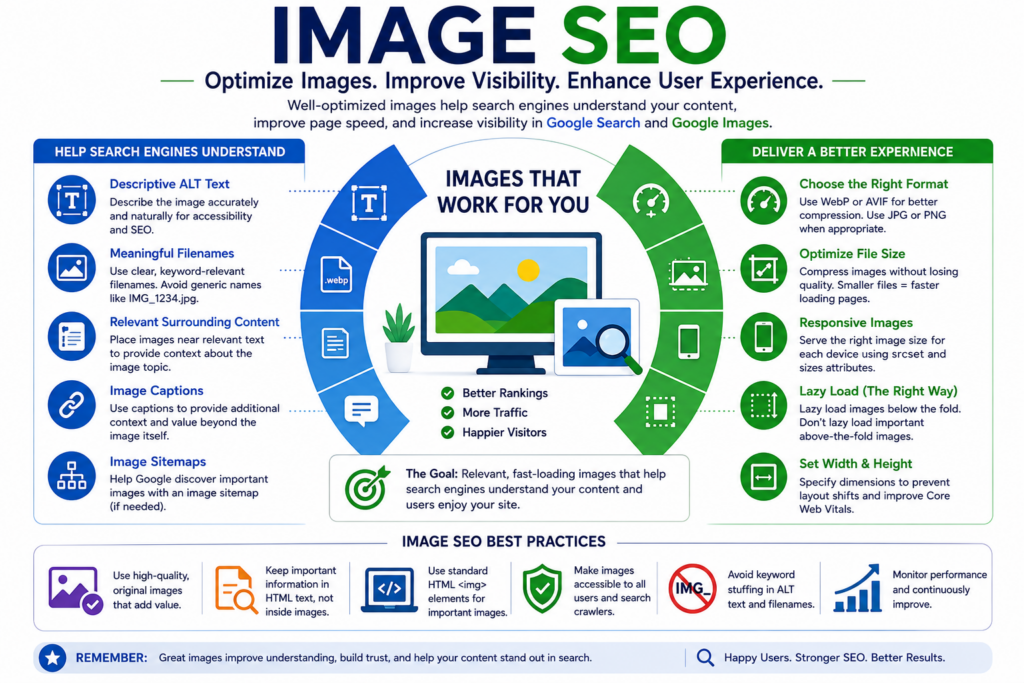
Key image SEO practices for improving accessibility, crawlability, image quality and page performance.
How to Write Image ALT Text for SEO
Alternative text, usually called ALT text, is one of the most important pieces of information associated with an image.
Its primary purpose is to describe the image for people who cannot see it, including visitors using screen readers. It can also help search engines understand the image.
Google describes ALT text as an important source of image metadata and recommends writing useful, information-rich descriptions that fit the context of the page.
Good ALT Text
Suppose an article contains a photograph of a hotel room overlooking the Las Vegas Strip.
A useful ALT description could be:
Luxury hotel room overlooking the Las Vegas Strip at nightThis tells the reader what is actually visible.
Poor ALT Text
A weak description would be:
image123It provides no meaningful information.
Keyword-Stuffed ALT Text
This would be worse:
Las Vegas hotel cheap Las Vegas hotel best Las Vegas hotels hotel deals Vegas hotelThe description is unnatural and does not accurately describe the image.
ALT text is not a field for repeating every keyword associated with a page.
Do Decorative Images Need Descriptive ALT Text?
Purely decorative images generally should not be given unnecessary descriptions.
When an image adds no informational value, an empty ALT attribute such as alt="" may be appropriate so assistive technology can ignore it.
The key question is simple: if someone could not see this image, what information would they need in order to understand its purpose?
Use Descriptive Image Filenames
An image filename can provide Google with a small amount of additional context.
Instead of uploading:
IMG_8472.webpuse something meaningful when practical:
las-vegas-hotel-room.webpFor an SEO infographic:
image-seo-best-practices.webpKeep filenames short, descriptive and readable.
There is no benefit in creating filenames such as:
best-image-seo-image-optimization-seo-images-google-ranking.webpGoogle describes filenames as providing only light clues about image subject matter, so there is no reason to stuff them with keywords.
Place Images Near Relevant Content
Image placement matters.
Google recommends placing images near text that is relevant to the subject shown in the image.
For example, an infographic explaining toxic backlinks belongs in the section where backlink quality is being discussed—not randomly at the bottom of an unrelated article.
The surrounding heading, paragraph, caption and page topic can all provide context.
This is one reason our SuperSEOPlus articles place explanatory graphics directly beside the section they support rather than adding decorative stock images throughout the page.
Use Captions When They Add Value
A caption can provide useful context that would be unnecessary or awkward inside ALT text.
For example:
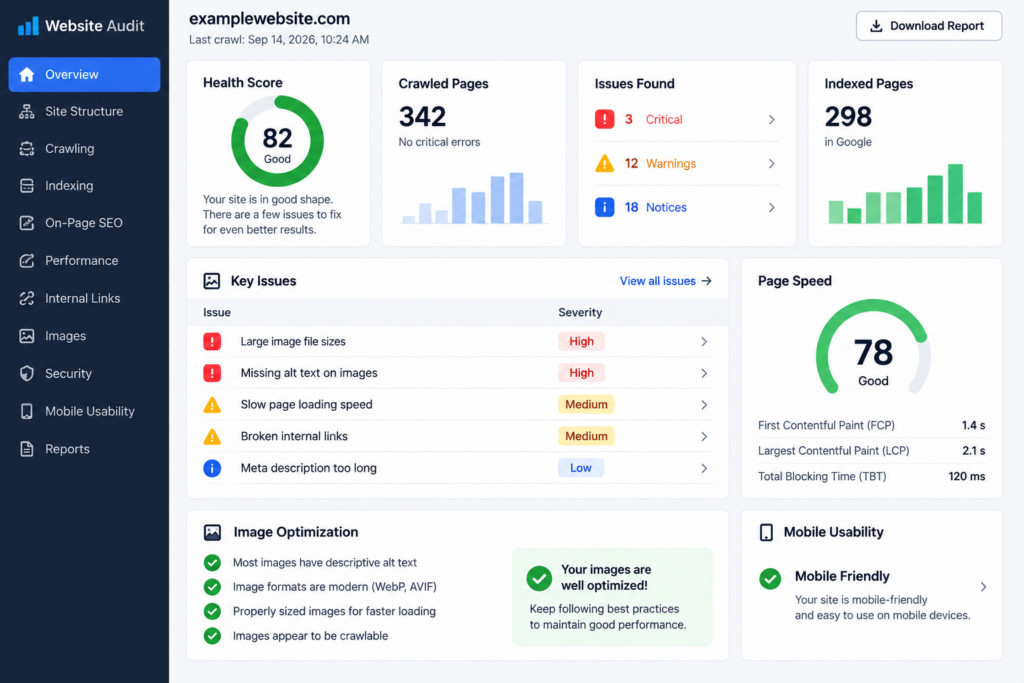
An SEO audit can identify crawling, indexing, performance and internal-linking problems.
The ALT text describes the visual. The caption explains why the image matters in the article.
They do not need to contain identical wording.
Choose the Right Image Format
Google Search supports several common image formats, including:
- JPEG;
- PNG;
- WebP;
- AVIF;
- GIF;
- SVG;
- BMP.
The best format depends on the image.
WebP
WebP is a practical choice for many WordPress websites because it can provide good visual quality at significantly smaller file sizes than older formats in many situations.
AVIF
AVIF can achieve excellent compression and is supported by Google Search, although your WordPress setup, image tools and browser requirements should be considered before using it everywhere.
JPEG
JPEG remains suitable for many photographic images.
PNG
PNG is useful when transparency or lossless graphics are required, but large PNG files can become unnecessarily heavy.
SVG
SVG is useful for logos, icons and scalable vector illustrations where appropriate.
Whatever format you choose, make sure the filename extension accurately reflects the actual file format.
Optimize Image Size Without Destroying Quality
High-resolution images can improve presentation, but uploading unnecessarily large files can slow a website considerably.
Images are often among the heaviest resources on a page.
A photograph exported directly from a camera might be several megabytes even though it appears only 800 pixels wide inside an article.
That wastes bandwidth and increases loading time.
A better workflow is:
- choose suitable dimensions;
- resize the original image;
- compress it intelligently;
- use an efficient format;
- check the visual quality;
- test the finished page.
Do not compress images so aggressively that important details become blurry. Google notes that clear, high-quality images are more appealing to users and can also make better search-result thumbnails.
Serve Responsive Images
A desktop visitor and a mobile visitor do not necessarily need the same image file size.
Serving a 2000-pixel-wide image to a small phone wastes data and may slow the page.
Responsive images allow the browser to select an appropriate version for the user's screen.
A simplified example looks like this:
<img
  src="image-800.webp"
  srcset="
    image-400.webp 400w,
    image-800.webp 800w,
    image-1200.webp 1200w"
  sizes="(max-width: 768px) 100vw, 800px"
  alt="Image SEO infographic showing optimization best practices"
  width="1200"
  height="800">
WordPress automatically generates multiple image sizes in many situations, so much of this can be handled by the CMS when images are inserted correctly.
Google recommends retaining a normal src value as a fallback when responsive image features such as srcset or <picture> are used.
Use Lazy Loading Carefully
Lazy loading delays some images until they are close to the visible part of the page.
It can reduce unnecessary downloads, particularly on long articles containing several images.
For an image lower on the page, HTML may contain:
<img
  src="image-seo-guide.webp"
  loading="lazy"
  alt="Image SEO optimization checklist"
  width="1200"
  height="800">
However, images visible immediately when the page opens should not automatically be lazy-loaded.
This is particularly important when the image is the page's largest visible element, because delaying it can hurt Largest Contentful Paint.
For an important hero image, normal eager loading is usually preferable.
Set Image Width and Height
Image optimization is not only about file size.
If the browser does not know an image's dimensions before the file arrives, surrounding text can suddenly move when the image loads.
This contributes to layout instability.
Adding width and height allows the browser to reserve the correct amount of space:
<img
  src="seo-infographic.webp"
  alt="SEO infographic"
  width="1200"
  height="800">
The image can still scale responsively through CSS while retaining its aspect ratio.
This improves the reading experience and helps prevent unnecessary layout shifts.
Images Used as Links Need Special Attention
An image can also function as a hyperlink.
When this happens, Google can use the image ALT attribute as anchor text for the destination.
For example:
<a href="/services/technical-seo/">
  <img
    src="technical-seo-audit.webp"
    alt="Technical SEO audit services">
</a>
The ALT text should accurately describe the linked image and help explain the destination.
This does not mean you should turn every image into a keyword-rich link.
Use image links only where they make sense for navigation or user experience.
For more information about link wording, see our guide to anchor text SEO best practices.
Choose a Strong Preferred Image for Search and Social Sharing
Featured images are not merely decorative elements inside WordPress.
Search engines and social platforms may use page images when presenting content.
Google's current image documentation explains that its image-preview selection is automated, but website owners can indicate a preferred image through page metadata.
For example, an Article or BlogPosting schema can include an image property, and Open Graph markup can specify:
<meta property="og:image"
      content="https://example.com/images/image-seo-guide.webp">
Google recommends choosing a preferred image that is relevant and representative of the page, uses a useful resolution and avoids extreme aspect ratios.
Google also advises against using generic images such as a site logo or text-heavy graphics as the preferred page image.
For this reason, an article can use two different visual assets:
- a clean featured image designed for search and social previews;
- a more detailed infographic inside the article.
This provides a better experience than forcing one graphic to perform every role.
Help Search Engines Discover Your Images
Images need to be accessible to search crawlers before they can appear in Google Images.
Google recommends embedding important images with normal HTML image elements.
For example:
<img src="image-seo-guide.webp"
     alt="Image SEO optimization guide">
Google specifically notes that it can discover images referenced through the src attribute of standard <img> elements.
Images used only as CSS backgrounds are handled differently and should not be relied on when the image itself is important search content.
Image Sitemaps
An image sitemap can help Google discover image URLs it might otherwise miss.
Many WordPress SEO configurations already include image information within XML sitemaps, so check your existing setup before installing another plugin or creating additional sitemap files.
The objective is to make images discoverable—not to create duplicate technical systems unnecessarily.
Keep Image URLs Consistent
If the same image is used across several pages, consistently referencing the same image URL can make crawling more efficient.
Avoid creating unnecessary duplicates of the same asset with slightly different filenames unless different versions are genuinely required.
Use Original Images When They Improve the Page
Not every article needs custom photography or elaborate graphics.
However, an original diagram or infographic can be extremely useful when it explains something that would otherwise require several paragraphs.
Examples include:
- technical SEO processes;
- site architecture diagrams;
- backlink comparisons;
- workflow explanations;
- before-and-after examples;
- data visualizations;
- step-by-step processes.
The image should contribute information rather than exist solely because an SEO tool recommends adding one.
A relevant image that genuinely improves understanding is more useful than several generic stock photographs with keyword-filled ALT attributes.
Common Image SEO Mistakes
1. Putting Essential Information Only Inside an Image
Important prices, instructions, headings, offers and calls to action should generally remain accessible as normal page text.
2. Keyword Stuffing ALT Text
ALT text should describe an image naturally rather than list keywords.
3. Leaving Meaningful Images Without ALT Text
Images that communicate useful information should normally have appropriate alternative descriptions.
4. Using Generic Filenames
A filename such as DSC00842.jpg provides less context than a concise descriptive filename.
5. Uploading Huge Images
A 5 MB photograph should not be served when a much smaller optimized file can provide essentially the same visual result.
6. Lazy-Loading the Main Hero Image
If an above-the-fold image is important to the initial page rendering, lazy loading may unnecessarily delay it.
7. Forgetting Width and Height
Missing dimensions can contribute to layout shifts as images load.
8. Adding Images That Have No Purpose
Decorative images do not automatically improve rankings. Every image should have a reason to be on the page.
9. Using the Same ALT Text on Every Image
Different images should have descriptions appropriate to what each one actually shows.
10. Making Every Image Clickable
If clicking an infographic simply opens a larger media attachment with no user benefit, setting the WordPress image link to None is often cleaner.
Image SEO Best Practices for 2026
- Use images that genuinely support the page content.
- Keep important information available as HTML text.
- Write descriptive and contextual ALT text.
- Avoid keyword stuffing.
- Use concise descriptive filenames.
- Place images near relevant text.
- Add captions when they provide useful additional context.
- Use modern, efficient image formats where appropriate.
- Compress large files without destroying visual quality.
- Serve responsive image sizes.
- Lazy-load below-the-fold images rather than critical hero images.
- Specify image dimensions to reduce layout shifts.
- Use standard HTML image elements for important images.
- Keep image URLs consistent.
- Choose a strong representative featured image.
- Make sure search crawlers can access your image files.
Image SEO Is About Context, Accessibility and Performance
The strongest image strategy does not attempt to trick search engines into seeing one message while visitors see another.
Instead, the written content and visual content should reinforce each other.
A heading explains the subject. The paragraph provides detail. The image makes the information easier to understand. The ALT text describes the image. The filename provides a small additional clue. The surrounding page provides context.
At the same time, efficient formats, responsive delivery and appropriate loading behavior prevent visual content from becoming a performance problem.
That combination is far more useful than simply inserting keywords into ALT fields.
Frequently Asked Questions About Image SEO
Does image SEO help Google rankings?
Images can contribute to the overall quality, usefulness and search visibility of a page and may also appear in Google Images and other search surfaces. There is no single image field that guarantees higher rankings.
What is the most important image SEO attribute?
ALT text is particularly important because it helps describe meaningful images for accessibility and provides search engines with useful information about image content. It should be accurate and natural.
Should every image include my focus keyword?
No. Use a keyword only when it naturally describes what the image shows. Adding the same focus keyword to every ALT field can result in inaccurate, repetitive descriptions.
Are WebP images good for SEO?
WebP is supported by Google Search and can provide good visual quality with efficient file sizes. The appropriate format still depends on the type of image and your website requirements.
Does Google index images loaded with CSS backgrounds?
Google recommends using standard HTML <img> elements for images you want it to discover and process. Important content images should therefore not rely solely on CSS backgrounds.
Should images be lazy-loaded?
Images below the initial viewport can often benefit from lazy loading. Important images visible when the page first loads, especially an image likely to become the Largest Contentful Paint element, should generally load normally rather than being delayed.
Should images contain text?
Images can contain labels or supporting text when appropriate, particularly in diagrams and infographics. Essential information should also be available in accessible page text rather than existing only inside an image.
Do image filenames affect SEO?
Google says filenames can provide light clues about an image's subject. Use short descriptive filenames when practical, but do not expect filename optimization alone to influence rankings significantly.
Should I add captions to every image?
No. Add a caption when it genuinely helps explain the image or its relevance to the surrounding content.
Final Thoughts
Image SEO works best when images are treated as part of the content rather than as containers for hidden marketing messages or keywords.
Choose visuals that improve the page. Describe meaningful images accurately. Keep filenames sensible. Place images beside relevant text. Compress them intelligently. Serve appropriate sizes. Avoid delaying important above-the-fold images and make sure search engines can access the files.
Most importantly, do not sacrifice usability or accessibility for an imagined SEO advantage.
A fast, clear page containing useful text and genuinely helpful visuals provides a much stronger foundation for search visibility than an image strategy built around keyword manipulation.
Need help improving image performance, technical SEO or website visibility? SuperSEOPlus can review your website and identify image, crawling, performance and on-page SEO issues that may be limiting organic growth.
About us and this blog
We are a digital marketing company with a focus on helping our customers achieve great results across several key areas.
Request a free quote
We offer professional SEO services that help websites increase their organic search score drastically in order to compete for the highest rankings even when it comes to highly competitive keywords.
More from our blog
See all posts





Recent Posts
- WordPress Website Design: 10 Powerful Tips & Complete Guide September 20, 2026
- Local Citation Building Services: Costs, Benefits & How to Choose September 18, 2026
- Toxic Backlinks: Can Bad Links Hurt SEO in 2026? August 31, 2026