Absolute vs Relative URLs for SEO: Which Should You Use in 2026?
- August 18, 2026
- SEO Guides
Absolute vs relative URLs are often discussed as though one format automatically gives a website an SEO advantage. That is not how modern search engines handle links.
Google can crawl both absolute and relative URLs when they are implemented correctly. For ordinary internal linking, the important factors are whether the link resolves to the correct destination, whether Google can crawl it, whether the destination is canonical, and whether the link helps users navigate the website.
There are, however, situations where the distinction matters. Canonical tags, XML sitemaps, content syndication, website migrations and poorly constructed relative paths can all create technical SEO problems if URLs are handled incorrectly.
This guide explains the difference between absolute vs relative URLs, how Google handles them in 2026, where each format should be used, and which URL mistakes can interfere with crawling, indexing and canonicalization.
What Is an Absolute URL?
An absolute URL provides the complete address of a page or resource. It normally includes the protocol, domain name and path.
For example:
https://superseoplus.com/services/technical-seo/The same URL used inside an HTML link would look like this:
<a href="https://superseoplus.com/services/technical-seo/">Technical SEO services</a>The destination is completely defined. It does not depend on the location of the page containing the link.
This makes absolute URLs particularly useful when content may leave the original website, such as in email campaigns, RSS feeds, exported documents or syndicated content.
What Is a Relative URL?
A relative URL provides only part of the destination address. The browser uses the current website or page as the reference point when determining the complete URL.
A root-relative link might look like this:
/services/technical-seo/Inside HTML:
<a href="/services/technical-seo/">Technical SEO services</a>When that link appears on https://superseoplus.com/, the browser resolves it as:
https://superseoplus.com/services/technical-seo/Google explicitly shows relative URLs as valid examples of crawlable links in its current documentation, provided they appear inside a normal <a> element with a valid href attribute.
You can review Google's official link best practices.
Absolute vs Relative URLs: Do Absolute Links Have More SEO Value?
No documented Google ranking advantage exists simply because an internal link uses an absolute URL instead of a valid relative URL.
This is one of the main areas where older SEO advice can be misleading.
Consider these two links:
<a href="https://superseoplus.com/services/technical-seo/">Technical SEO services</a>and:
<a href="/services/technical-seo/">Technical SEO services</a>Both can point to exactly the same page.
Google's current documentation demonstrates that it can parse both absolute and relative URLs. The important issue is whether the link is crawlable and resolves correctly—not whether the domain name is repeated inside every internal link.
The anchor text and surrounding context can also help users and Google understand the destination. Descriptive links are therefore more useful than trying to gain an imagined advantage from URL format alone.
If you are reviewing your link profile as part of a wider SEO audit, read our guide to toxic backlinks and Google's link spam policies.
Types of Relative URLs
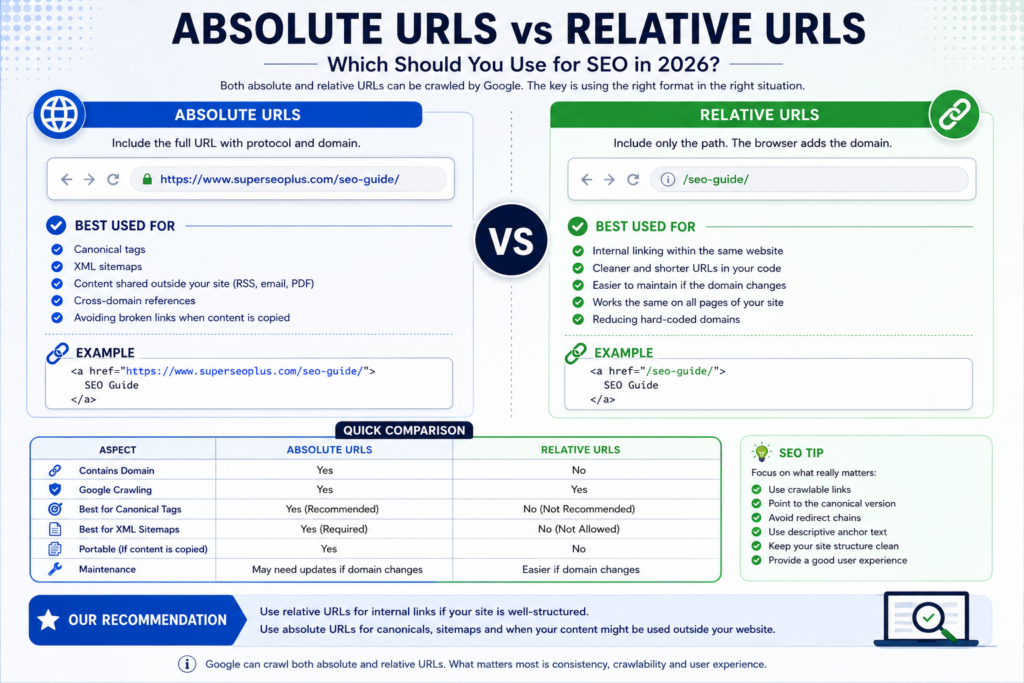
Absolute and relative URL examples, including when each format should be used for SEO, canonical tags and XML sitemaps.
Not all relative URLs work in exactly the same way. Understanding the difference can help prevent technical problems.
Root-Relative URLs
A root-relative URL begins with a forward slash:
/seo-guides/It starts from the root of the current domain.
If it appears anywhere on superseoplus.com, the destination remains:
https://superseoplus.com/seo-guides/This makes root-relative URLs predictable and relatively easy to manage for internal navigation.
Document-Relative URLs
A document-relative URL does not begin with a slash:
seo-guide/The browser resolves it relative to the directory containing the current page.
That means the same link can lead to different destinations depending on where it appears.
Parent-Relative URLs
Parent-relative paths use ../ to move up through a directory structure.
For example:
../../seo-guide/These links can work, but they are easier to break when pages or templates are moved.
For most modern websites, clean root-relative or absolute links are easier to understand and maintain than complicated chains of parent-relative paths.
Absolute vs Relative URLs: Quick Comparison
| Feature | Absolute URL | Relative URL |
|---|---|---|
| Contains protocol | Yes | No |
| Contains domain name | Yes | No |
| Crawlable by Google | Yes | Yes, when properly formed |
| Suitable for internal links | Yes | Yes |
| Recommended for canonical tags | Yes | No |
| Suitable for XML sitemaps | Yes | No |
| Portable when content is copied | Yes | Usually no |
| Depends on current domain | No | Yes |
Should Internal Links Use Absolute or Relative URLs?
For ordinary internal linking, both formats can work perfectly well.
A correctly configured WordPress website may generate absolute URLs automatically. Another content management system may use root-relative URLs. Neither approach needs to be changed purely because of SEO myths surrounding absolute links.
What matters more is that your internal links:
- use crawlable HTML links;
- point to working pages;
- lead directly to the preferred destination;
- avoid unnecessary redirect chains;
- use descriptive anchor text;
- connect related content naturally;
- help Google discover important pages;
- help visitors navigate the website.
Google recommends that every page you consider important should receive a link from at least one other page on your website.
This makes the quality of your internal linking structure far more important than whether each link contains your complete domain name.
Avoid Linking Through Redirects
Suppose an old internal link points to:
http://superseoplus.com/services/seo/and that URL redirects to:
https://superseoplus.com/services/seo-optimization/The link may still function, but it is better to update the internal link so it points directly to the final HTTPS destination.
This reduces unnecessary requests and keeps internal signals consistent.
Use Absolute URLs for Canonical Tags
Canonical tags are one area where the choice is much clearer.
A canonical tag tells search engines which URL you prefer when multiple URLs contain the same or very similar content.
A normal self-referencing canonical might look like this:
<link rel="canonical" href="https://superseoplus.com/example-page/">Google supports relative URLs in canonical annotations, but its current documentation recommends using absolute paths rather than relative paths.
One reason is that a relative canonical can accidentally resolve against the wrong hostname if a staging or development environment becomes accessible to search engines.
Preferred:
https://superseoplus.com/example-page/Not recommended:
/example-page/You can review Google's official canonical URL guidance.
If Rank Math already generates your canonical URL correctly, do not manually add a second canonical tag to the page.
XML Sitemaps Should Use Absolute URLs
XML sitemaps are another situation where you should use complete URLs.
Google's sitemap documentation instructs website owners to use fully qualified absolute URLs.
Correct:
https://superseoplus.com/seo-guides/Incorrect:
/seo-guides/Google attempts to crawl sitemap URLs exactly as they are listed, which is why the protocol and hostname should be included.
See Google's official XML sitemap guidance.
If Rank Math generates your WordPress sitemap automatically, you normally do not need to edit individual sitemap URLs manually.
Do Absolute URLs Help When Content Is Copied?
This was one of the arguments frequently used in older discussions about absolute vs relative URLs, and there is still some practical logic behind it.
Imagine another website copies an article while preserving its HTML.
An absolute internal link such as:
https://superseoplus.com/services/technical-seo/continues to point to SuperSEOPlus.
A relative link such as:
/services/technical-seo/could instead resolve against the copying website's domain.
This does not mean Google rewards absolute URLs with additional ranking power. It simply means that complete URLs are more portable when content is reproduced outside its original environment.
This may be useful for:
- RSS feeds;
- email newsletters;
- legitimate syndication;
- content exports;
- partner websites;
- documents generated from website content.
Absolute links should not, however, be treated as protection against content scraping. A scraper can remove or modify links, and duplicate-content handling involves much more than the format of your internal URLs.
Absolute and Relative URLs During Website Migrations
Website migrations are another situation where URL consistency becomes important.
Imagine a website moves from:
http://example.com/to:
https://example.com/Hard-coded absolute links pointing to the old HTTP address can remain inside pages after the migration.
Those links may still work because the server redirects them, but they create unnecessary redirects and should be updated.
Similarly, a domain migration from:
https://oldexample.com/to:
https://newexample.com/requires careful updates to internal links, canonical annotations and sitemap URLs.
Google recommends updating internal links to point directly to new URLs during a site move rather than relying indefinitely on old internal URLs.
Common Absolute and Relative URL SEO Mistakes
1. Mixing HTTP and HTTPS
If your preferred website version uses HTTPS, your internal links should not routinely point to HTTP URLs.
Even when redirects are configured correctly, linking directly to HTTPS is cleaner and avoids unnecessary redirects.
2. Mixing WWW and Non-WWW Versions
If your preferred hostname is:
https://superseoplus.com/avoid randomly linking internally to:
https://www.superseoplus.com/Consistency makes crawling, analytics and canonicalization easier to manage.
3. Incorrect Relative Paths
Relative paths can break if they depend on a directory structure that later changes.
Always verify that the final URL resolves to the page you intended.
4. Relative URLs in XML Sitemaps
Sitemaps should contain complete absolute URLs.
5. Poor Canonical Implementation
Use absolute URLs for canonical annotations and make sure the canonical points to the actual preferred version of the page.
6. Internal Links Pointing Through Redirects
If a page has permanently moved, update the internal links instead of continuing to link to the old address.
7. Broken Links After a Migration
Hard-coded URLs from an old domain, staging environment or HTTP version can remain buried inside articles and templates after a migration.
8. Linking to Non-Canonical URL Variations
Parameters, hostname variations, protocol differences and trailing-slash inconsistencies can create multiple addresses for similar content.
Where possible, your internal links should consistently point to the preferred canonical version.
Absolute vs Relative URLs: SEO Best Practices for 2026
- Do not convert links merely because you believe absolute URLs rank better. Google can crawl properly implemented absolute and relative links.
- Use ordinary crawlable HTML links. A standard
<a href>implementation remains the safest option for important navigation. - Use absolute URLs for canonical tags. Google recommends them instead of relative canonical paths.
- Use fully qualified absolute URLs in XML sitemaps.
- Keep your preferred hostname consistent. Avoid unnecessary mixing of www and non-www versions.
- Use HTTPS consistently. Link directly to HTTPS pages instead of relying on HTTP-to-HTTPS redirects.
- Link directly to canonical destinations. Avoid unnecessary redirect chains.
- Use descriptive anchor text. Tell readers what they will find when they follow a link.
- Audit links after migrations. Look for outdated domains, HTTP URLs, staging addresses and old URL structures.
- Prefer maintainability over SEO folklore. A consistent, technically reliable linking system is more valuable than forcing a particular URL format everywhere.
Which URL Format Should a WordPress Website Use?
For most WordPress websites, there is no reason to manually convert every internal link from one format to another simply for ranking purposes.
WordPress commonly generates complete absolute URLs for menus, posts and many other internal elements. That is perfectly acceptable.
If a theme or custom application uses valid root-relative links, those can also be crawled successfully.
The areas worth checking are much more practical:
- Does every important URL use HTTPS?
- Do internal links point directly to the correct page?
- Are old domains or staging URLs still present?
- Does each page have the correct canonical?
- Does the sitemap contain the preferred canonical URLs?
- Are important pages linked contextually from other relevant pages?
These checks provide far more SEO value than changing working links merely to make them absolute.
Frequently Asked Questions About Absolute vs Relative URLs
Are absolute URLs better for SEO than relative URLs?
No inherent ranking advantage is documented by Google for normal internal links. Google can crawl both absolute and properly constructed relative URLs.
Can Google crawl relative URLs?
Yes. Google's current link documentation specifically shows relative href values among its recommended crawlable link examples.
Should internal links use absolute URLs?
They can, but they do not have to. Both absolute and valid relative URLs can work for internal navigation. Consistency, crawlability and destination accuracy matter more.
Should canonical URLs be absolute?
Yes. Although Google supports relative canonical paths, Google recommends absolute URLs for canonical annotations because they reduce the risk of implementation problems.
Can relative URLs be used in XML sitemaps?
No. Google instructs website owners to use fully qualified absolute URLs in sitemaps.
Are root-relative URLs safe for SEO?
Yes, provided they resolve correctly. A root-relative URL such as /services/technical-seo/ can be crawled by Google.
Do absolute URLs prevent content theft?
No. They may preserve links back to your domain when HTML is copied without modification, but they do not prevent scraping or unauthorized copying.
Should I change all existing relative URLs to absolute URLs?
Not if they are already valid, crawlable and pointing to the correct canonical destinations. A sitewide change solely for SEO is unlikely to provide a ranking benefit.
Final Thoughts
The absolute vs relative URLs debate has often been made more complicated than necessary.
For ordinary internal links, both formats can work. Google can crawl properly constructed absolute URLs as well as relative URLs, and there is no reason to expect an automatic ranking boost simply because a link contains the full domain name.
The distinction becomes important when technical standards require greater precision. Canonical tags should use absolute URLs, XML sitemaps should contain fully qualified URLs, and website migrations require consistent updates to internal links and canonical signals.
Focus on what actually matters: clean crawlable links, correct canonical URLs, consistent HTTPS usage, descriptive anchor text, reliable internal navigation and a sitemap containing the URLs you genuinely want search engines to discover.
Need help finding URL, crawling, indexing or internal-linking problems? SuperSEOPlus can review your technical SEO setup and identify issues that may be limiting your organic visibility.
About us and this blog
We are a digital marketing company with a focus on helping our customers achieve great results across several key areas.
Request a free quote
We offer professional SEO services that help websites increase their organic search score drastically in order to compete for the highest rankings even when it comes to highly competitive keywords.
More from our blog
See all posts




Recent Posts
- How to Rank Higher on Google Maps: What to Fix First October 22, 2026
- Can You Do Local SEO Without a Website? What Works and What Doesn't October 22, 2026
- Service-Area Business on Google Maps: How to Set It Up Properly October 20, 2026