Service-Area Business on Google Maps: How to Set It Up Properly
- October 20, 2026
- Local SEO
A service area business Google Maps profile is for a company that travels to customers, or serves them at their location, rather than welcoming them at a shopfront. Plumbers, cleaners, electricians, mobile mechanics and many landscapers fit this description. On Google Maps these businesses can hide their address and show the areas they serve instead, but they still need to follow Google's rules and set things up carefully to be visible.
This guide explains how service-area businesses work on Google Maps, how to set up your area properly, what happens to your rankings when your address is hidden, and the mistakes that cause suspensions or poor visibility. For Google's own explanation, see its tips to improve your local ranking.
Table of Contents
Service area business Google Maps rules: what counts
Google's guidelines for representing your business distinguish between businesses that serve customers at a physical location and those that travel to customers. If you visit or deliver to customers, you can be treated as a service-area business. Some businesses are both, for example a shop that also delivers.
Check Google's current guidelines before choosing, as eligibility rules apply. In particular:
- You should have a real way of operating in the area you list, not just a postcode you would like to attract.
- Virtual offices, mailboxes and rented desks that no one staffs generally do not qualify as a location.
- If you work from home, you can usually hide your home address while still being eligible, provided you serve customers at their location.
Setting up your service area
- Choose your business type correctly. If customers do not visit you, set the profile as a service-area business and hide the address.
- List the areas you genuinely serve. Use towns, cities or postcode areas you actually cover. Google limits how many areas you can add, so choose the ones that matter.
- Be realistic about distance. A very large claimed area does not mean you will rank everywhere in it.
- Keep your details consistent with your website and directories.
For general profile advice, see our Business Profile optimisation checklist.
How rankings work when your address is hidden
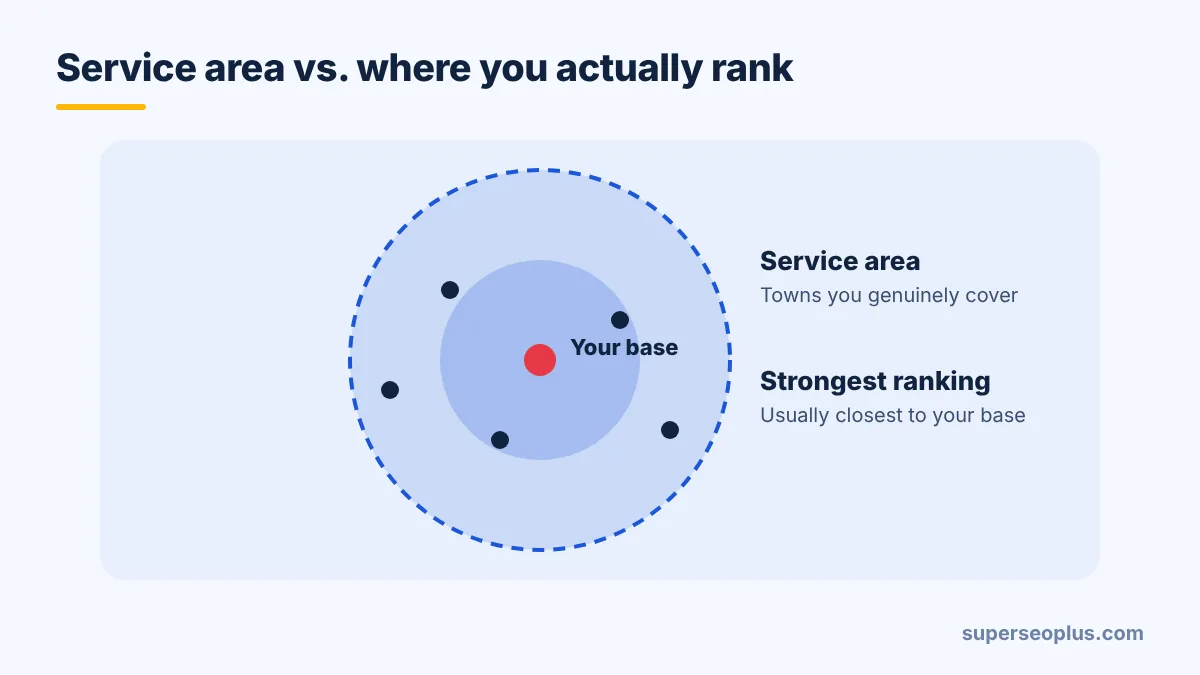
Google names relevance, distance and prominence as the main local ranking factors. When your address is hidden, Google still has a location associated with your business, and distance still matters. In practice this means:
- You will probably rank best close to your base, and less well farther away.
- Listing a town in your service area does not guarantee you will appear in the local results there.
- Reviews, a strong website and accurate categories matter even more when you cannot rely on proximity.
Our guide to ranking higher on Google Maps explains how to compete on relevance and prominence.
Should you build pages for each area you serve?
If you genuinely work in several towns, a dedicated page for each can help customers and search engines understand where you operate. Make each page genuinely useful:
- Mention real local detail: the areas you cover, typical jobs, local property types, and any local regulations.
- Show relevant projects and reviews from that area.
- Avoid templated pages where only the town name changes. They add little value and look spammy.
Common mistakes
- Using a fake or virtual address to appear to be in a bigger city. This is a common cause of suspension. See Google Business Profile suspended: how to fix it.
- Showing a home address that you do not want customers to visit.
- Hiding the address but leaving the service area empty, which hurts visibility. See why a business may not show on Google Maps.
- Listing too many areas in the hope of ranking everywhere.
- Adding keywords or locations to the business name.
- Creating duplicate profiles for each town.
Consistency still matters
If you hide your address on Google, use the same approach on other directories where possible. Publishing your home address on some listings and hiding it on others creates mixed signals and privacy risks. See NAP consistency explained and our list of local citation sites for UK and US businesses.
Need Consistent Listings That Match Your Service Area Set-Up?
Service-area businesses need their details to line up across directories, including how the address is shown. If you would like professional help, explore our Google Maps citations service on Fiverr.
Reviews are your proximity substitute
When customers cannot see a shopfront, reviews carry extra weight. Ask after every job, reply to all feedback and encourage customers to mention the type of work and the area where it is natural for them to do so. Never script reviews or offer rewards. See how to get Google reviews.
Service area business Google Maps: key takeaways
Service area business Google Maps profiles work best when the address is hidden only if you really travel to customers, and the area you list is realistic. Good service area business Google Maps set-up also means consistent details elsewhere, so customers and Google see one business. Treat any service area business Google Maps profile as a living record and review it whenever your coverage changes. If rankings drop, check the service area business Google Maps basics first: eligibility, categories and duplicates.
Frequently asked questions
Can I hide my home address on Google Maps?
If you serve customers at their location, you can generally hide your address and show a service area instead. Check Google's current guidelines.
How many areas can I list?
Google limits the number of service areas. Choose the places you genuinely serve and where you can realistically compete.
Will listing a town make me rank there?
No. It tells Google where you work, but ranking still depends on relevance, distance and prominence.
Can I have one profile per town?
Only if you have a real, staffed location in each. Creating profiles for places you do not operate from breaches the guidelines.
Want help checking your set-up? Request a free SEO analysis.
About us and this blog
We are a digital marketing company with a focus on helping our customers achieve great results across several key areas.
Request a free quote
We offer professional SEO services that help websites increase their organic search score drastically in order to compete for the highest rankings even when it comes to highly competitive keywords.
More from our blog
See all posts






Recent Posts
- Service-Area Business on Google Maps: How to Set It Up Properly October 20, 2026
- SEO Backlinks Explained: How They Work and How to Earn Them October 19, 2026
- On-Page SEO Checklist: 13 Checks for Every Page October 18, 2026