Why Is My Business Not Showing on Google Maps? 10 Causes and Fixes
- October 26, 2026
- Local SEO
Why is my business not showing on Google Maps? Usually because its Google Business Profile is unverified, suspended, still new, ineligible, incomplete, or simply outranked for the search being tried. Each cause has a different fix, so the fastest route is to work out which problem you actually have before changing anything.
Google states that only verified businesses can show their details on Maps and Search, and that edits can take a few days to appear. Beyond that, whether you appear at all and where you rank depends on relevance, distance and prominence. This guide walks through a simple diagnostic, then the ten most common causes and what to do about each one.
Table of Contents
First, work out whether you are missing or just ranking low
These are two different problems and people often confuse them.
- Missing: searching your exact business name and town returns nothing, or a different business.
- Ranking low: your exact name finds you, but "plumber near me" or "dentist in [town]" does not.
If you are ranking low rather than missing, the fix is about competing better, not about visibility errors. Our guide on how to rank higher on Google Maps covers that side. The rest of this article is about being missing or hidden.
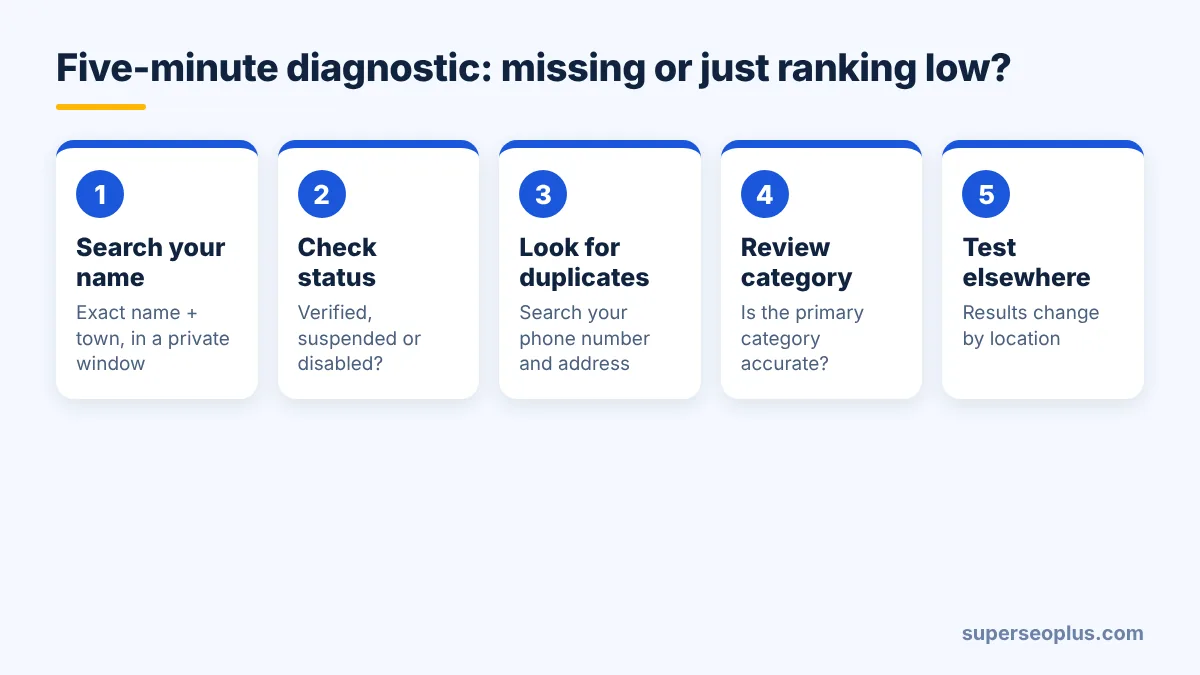
A five-minute diagnostic
- Search your exact name plus town in Google Maps while logged out or in a private window. Note whether a listing, a pin, or nothing appears.
- Sign in to the Google account that manages the profile and search "my business" on Google, or open the Business Profile Manager. Check the status banner for "Verified", "Verification needed", "Suspended" or "Disabled".
- Check for a duplicate by searching your phone number and your address. Another listing, possibly old, may be taking the spot.
- Look at your category and location. Is the primary category accurate, and does the address or service area match reality?
- Test from a different place. Local results are personalised and distance-based, so searching from your own office tells you very little about what customers see.
The 10 most common reasons, and the fix for each
1. The profile is not verified
Without verification your information will not appear publicly the way it should. Finish verification in the Business Profile Manager using the method Google offers you (video, phone, email or postcard, depending on the business). If a postcard has not arrived after the stated time, request verification again rather than creating a second profile.
2. The profile has been suspended or disabled
Suspensions typically follow a guideline issue such as a name that does not match your real-world branding, an address that does not qualify, or a change that triggered a review. Read the notice in your account, correct the cause, and submit a reinstatement request with evidence. We cover that in detail in Google Business Profile Suspended? How to Fix It.
3. The listing is brand new
New profiles and recent edits can take time to appear. If you verified recently, make sure everything is complete, then give it a few days before escalating. Repeatedly editing the name, category or address while you wait can make things worse, as changes can trigger fresh checks.
4. Your business does not meet Google's eligibility rules
Google wants businesses that serve customers in person, either at a staffed location or by travelling to customers. Virtual offices, mailbox addresses, and a home address you do not serve customers from can all cause problems. Check Google's guidelines for representing your business before concluding that something is "broken".
5. You have hidden your address but have no service area
Service-area businesses can hide their address, but they must define the areas they serve. If an address is hidden and the service area is missing or unrealistic, visibility can suffer. See our guide to service-area businesses on Google Maps.
6. Wrong or vague category
Your primary category tells Google what you are. "Contractor" will not compete with "Roofing contractor" for roofing searches. Choose the most specific accurate primary category and add secondary categories only where they genuinely apply. Our Business Profile optimisation checklist explains how to choose.
7. A duplicate or old listing is interfering
Old addresses, previous owners and merged businesses often leave duplicates behind. Search for them, then use Google's tools to mark the duplicate as closed or request removal rather than editing it into a copy of the live listing.
8. Inconsistent business details around the web
If your name, address and phone number differ across directories, Google has to guess which version is correct. This is an industry observation, not a documented ranking rule, but cleaning up conflicting details is sensible housekeeping. Read our explanation of NAP consistency, and see below for how to approach it.
9. The business has been flagged or removed as closed
Occasionally a listing is marked "permanently closed" by mistake, often after an edit suggestion. Check the profile status and reopen it if it is wrong.
10. You are simply not competitive for that search
Google lists relevance, distance and prominence as the main factors. A business can be verified, accurate and visible, yet sit below dozens of better-known competitors nearer to the searcher. That calls for more reviews, a stronger website and a better profile, not a technical fix.
Where citations and consistent listings fit in
Citations are mentions of your business name, address and phone number on other sites. Google does not publish citations as a guaranteed ranking factor, and no number of listings can overcome a suspended profile or an ineligible address. What they can do is remove contradictions that make your details look unreliable, and support the wider picture of a legitimate local business. Fix the profile itself first, then tidy the rest.
Need Help Cleaning Up Your Business Listings?
If your details are inconsistent across directories, tidying them up can be slow, fiddly work. If you would prefer professional help, you can explore our Google Maps citations service on Fiverr. It supports accurate listings, but it will not fix a suspended profile or guarantee rankings.
What to do if nothing works
- Check Google's official Find your business on Google help page for status and troubleshooting steps.
- Contact Business Profile support from inside your account and keep a record of dates and case numbers.
- Gather evidence that you operate a real business: signage, licences, invoices, utility bills and photographs.
- Avoid creating a new profile just to get around a problem, as this can create duplicates and further suspensions.
Quick summary: business not showing on Google Maps
If your business is not showing on Google Maps, start by separating a missing listing from a low ranking. A business not showing on Google Maps is most often unverified, suspended, ineligible or still new, so check the status in your account first. Fix the profile before you worry about citations or links, because a business not showing on Google Maps at all cannot rank for anything. Most cases of a business not showing on Google Maps can be traced back to one of the ten causes above. Once the listing is visible, build reviews and keep your details consistent.
Frequently asked questions
Why is my Google Business Profile not showing up in search?
The commonest causes are that it is unverified, suspended, still new, or ranking below competitors. Use the diagnostic above to tell which one applies.
Why is my business not showing on Google Maps after verification?
Changes can take a few days to appear. If nothing shows after that, check for a duplicate listing, a closed status or a category problem, and make sure the profile is complete.
Can I pay to appear on Google Maps?
No. Google says you cannot pay for a better organic local ranking. Ads are a separate product and do not affect organic visibility.
Do I need a website to appear on Google Maps?
No, but a website helps. See our article on local SEO without a website for what works and what does not.
If you are still unsure what is holding your profile back, you can request a free SEO analysis and we will take a look.
SuperSEOPlus Editorial is the editorial byline for articles published on SuperSEOPlus. It is a publication byline, not an individual author. The guides cover SEO, local SEO, link building, content marketing, WordPress and digital marketing, and aim to explain how these topics work in practical terms. Where an article recommends third-party tools or products, any affiliate relationship is disclosed in the article. We do not guarantee rankings, traffic or income.
About us and this blog
We are a digital marketing company with a focus on helping our customers achieve great results across several key areas.
Request a free quote
We offer professional SEO services that help websites increase their organic search score drastically in order to compete for the highest rankings even when it comes to highly competitive keywords.
More from our blog
See all posts


Recent Posts
- WordPress Redirect Chains: Build a Safe URL Repair Map November 9, 2026
- Duplicate Title Tags in WordPress: Identify Which Problem You Have November 7, 2026
- Sitemap Couldn’t Fetch in WordPress: Find the Failing Request November 5, 2026