Duplicate Title Tags in WordPress: Identify Which Problem You Have
- November 7, 2026
- Wordpress
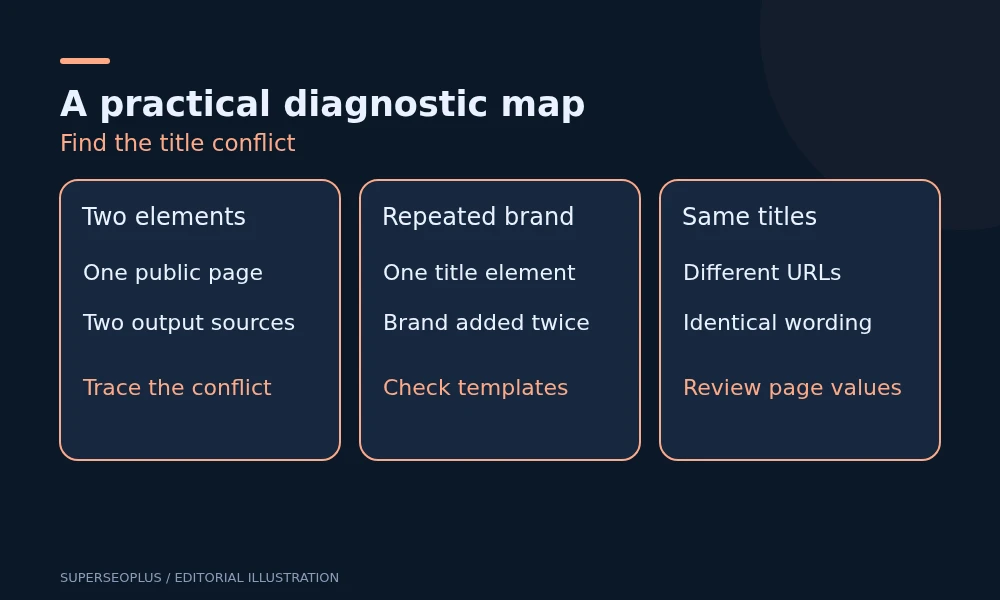
“Duplicate title tags in WordPress” can describe several different problems. You may have two title elements on one page, the same title across different pages, or a repeated brand name inside a single title. Inspect the public output first: each problem requires a different repair.
A changed title in Google’s results is another situation again. Google can generate a title link that differs from your supplied title, even when the HTML is correct.
Identify which duplicate title tags in WordPress you have
Pick a URL with duplicate title tags in WordPress and open it while signed out. Use View page source and search for <title. Look for the document’s title element in the head, rather than a title attribute on a link or image.
- Two head title elements: more than one component may be outputting the document title.
- One element with repeated wording: the saved title and an automatic template may both add the brand.
- One sensible title here, but the same title elsewhere: inspect page-level values and shared templates across those URLs.
- Correct source, different Google result: investigate the search title separately from HTML duplication.
Save the source or a short extract before editing. The value in an SEO plugin’s preview is an input to the output; it is not proof of what visitors receive.
Use a browser check to count head title elements
If you are comfortable using browser developer tools, this read-only JavaScript lists title elements in the current page’s head:
Array.from(
  document.head.querySelectorAll(
    'title'
  ),
  element => element.textContent.trim()
)
One array entry means one matching element in the current document head. Two entries mean two elements. Compare this result with View Source because scripts can change the document after the initial HTML arrives.
This is a diagnostic of the page you opened. It does not tell you how every page on the site behaves, and it does not show which plugin or theme produced each element.
If one page has two title elements
Ask the developer to identify both output sources. Common possibilities include a hardcoded title in a theme and another generated through WordPress, or an additional SEO component producing competing output.
WordPress documents theme support for the title-tag feature. The repair should follow the theme’s supported implementation, rather than hide one title with styling or add a third title to override the others.
Test the repair on a staging copy where possible. Disabling components across the live site can affect unrelated metadata and visitor functions. Give the developer the two title values, affected template and public source evidence so the conflict can be isolated.
Do not paste replacement PHP into a production theme without checking its architecture. Classic themes, block themes and builder integrations can organise output differently. An update-safe repair needs to fit the actual theme.
If the brand appears twice in one title
Compare the page’s SEO title with the global title template. A page value such as “Drain Repairs | Example Company” combined with a template that appends the site name can produce repeated branding.
Illustration: the source shows one element containing “Drain Repairs | Example Company | Example Company”. Removing the extra brand from the appropriate input may resolve the repetition. Deleting a title-output hook would address the wrong problem.
After an approved change, check the public title again. If an older cached response remains, use the site’s normal cache workflow and verify the refreshed output. Avoid assuming a preview refresh also refreshed public HTML.
For checks beyond document titles, the technical SEO checklist helps identify whether the same template also affects canonical output or indexing controls.
If many pages have the same title
Choose examples of duplicate title tags in WordPress from each affected template: a post, a service page and an archive where applicable. Record their URLs, visible main headings and source titles. Determine whether the duplication is sitewide or limited to one content type.
Check whether the template uses a fixed phrase instead of a page-specific value, whether a bulk import filled identical SEO fields, or whether distinct URLs intentionally represent the same content. The last case requires a URL-purpose review rather than dozens of rewritten titles.
For genuinely different pages, write titles that explain their actual subject or service. Google’s title-link guidance recommends descriptive, concise titles and discourages boilerplate and keyword stuffing. There is no universal character count that guarantees the complete title will display.
Our on-page SEO checklist helps review the relationship between title, heading and page content.
If only Google’s displayed title is different
Check when the page was last crawled and whether your source change happened later. Also compare the title with the main heading and prominent on-page wording. Conflicting descriptions can make the intended page subject less clear.
Google’s displayed title is not a faithful view-source tool. A rewrite does not by itself prove duplicate HTML, a broken plugin or a penalty. Fix demonstrated output problems first; do not repeatedly edit a correct title to chase every displayed variation.
Yoast’s title troubleshooting guide explains several source and template conflicts. Even on a site using a different SEO plugin, the distinction between inputs, generated HTML and Google’s display remains useful.
Verify beyond the original page
Retest the affected URL while signed out, then inspect other pages using the same template. Check the homepage, a normal post, a service page and a category archive if those share the repaired component.
- Confirm one intended document title in the public output.
- Confirm distinct pages have appropriately distinct wording.
- Check that the brand appears as intended.
- Confirm the main heading and page content still make sense.
- Keep a dated record for later crawl and search-result review.
A template repair can fix many pages at once, but it can also remove titles from templates you did not inspect. That is why a small representative regression check matters.
Common questions
Is an H1 another title tag?
No. The visible main heading and the head title element have different roles. Matching wording between them is not the same as two document title elements.
Will fixing duplicate title tags in WordPress guarantee higher rankings?
No. Repairing duplicate title tags in WordPress improves clarity and output quality. Rankings depend on many other factors.
If the source of a repeated title is unclear, share the public HTML and template sample with a technical SEO reviewer before changing sitewide settings.
SuperSEOPlus Editorial is the editorial byline for articles published on SuperSEOPlus. It is a publication byline, not an individual author. The guides cover SEO, local SEO, link building, content marketing, WordPress and digital marketing, and aim to explain how these topics work in practical terms. Where an article recommends third-party tools or products, any affiliate relationship is disclosed in the article. We do not guarantee rankings, traffic or income.
About us and this blog
We are a digital marketing company with a focus on helping our customers achieve great results across several key areas.
Request a free quote
We offer professional SEO services that help websites increase their organic search score drastically in order to compete for the highest rankings even when it comes to highly competitive keywords.
More from our blog
See all posts



Recent Posts
- Duplicate Title Tags in WordPress: Identify Which Problem You Have November 7, 2026
- Sitemap Couldn’t Fetch in WordPress: Find the Failing Request November 5, 2026
- Google Chose a Different Canonical: A WordPress Comparison Checklist November 3, 2026