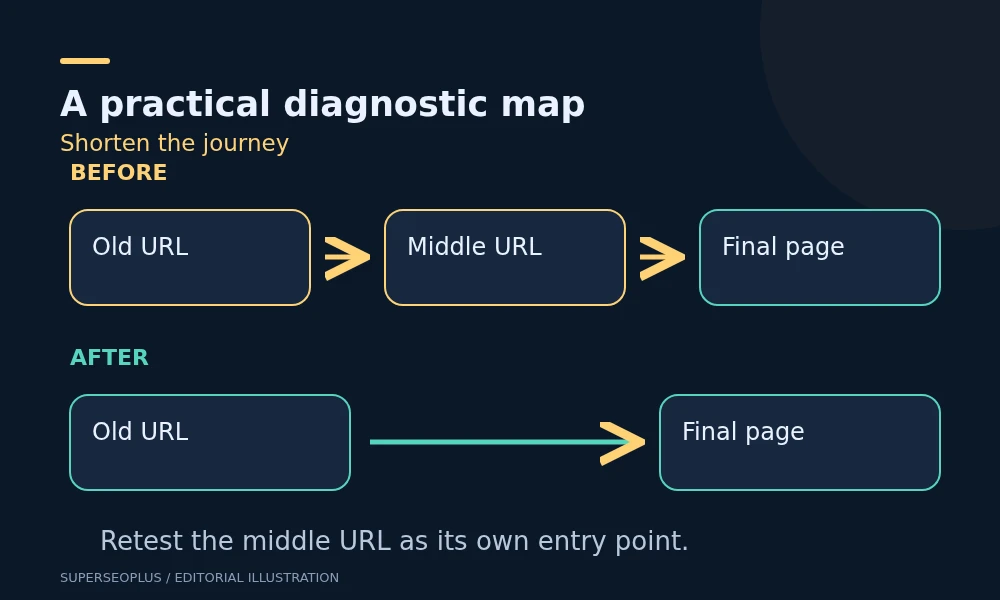
WordPress redirect chains send a visitor through multiple redirects before reaching a page. Build a map of the actual route, decide the correct final destination, and repair unnecessary intermediate rules. Then test both the original and intermediate URLs so older links keep working.
A redirect loop is more urgent than ordinary WordPress redirect chains: the route revisits an earlier URL and never reaches the intended page. Do not treat every redirect as an error. Redirects are useful when a page moves or an address needs a consistent form.
Start with a repair map for WordPress redirect chains
For each affected address, write down the starting URL, every observed destination, the final response and the desired outcome. Include why the redirect exists if that history is known.
Illustrative migration map:
/old-audit/redirects to/seo-check/./seo-check/redirects to/technical-audit/./technical-audit/returns the intended service page.
The proposed repair is to send both older addresses directly to the final equivalent page. Deleting the intermediate rule without checking its own incoming links could break visitors who still use that address.
Capture the route with a real request
The following command follows HTTP redirects and prints response headers. Replace the example with an affected public URL. It reads the site and does not change redirect rules.
curl --silent --show-error --location --max-redirs 10 --connect-timeout 10 --max-time 30 --dump-header - --output /dev/null 'https://example.com/old-audit/'Read the status and Location from each response block. If curl reports too many redirects, keep the captured route; do not simply raise the limit until the problem disappears from view.
This command does not execute JavaScript or HTML refresh instructions. If the browser continues navigating after the HTTP route ends, inspect the browser Network panel and page output as well.
Decide whether the final destination is correct
A final 200 response is necessary for a normal destination page, but it does not establish relevance. Read the destination. A deleted service redirected to the homepage may reach a working page while losing the original visitor’s task.
Use an equivalent replacement where one exists. Where a page has genuinely been removed without a replacement, a proper not-found response may be appropriate. Avoid manufacturing a redirect solely to eliminate an audit warning.
Google’s redirect documentation explains permanent and temporary methods. Choose the method based on the intended change rather than replacing every temporary redirect mechanically.
Find who owns each rule
WordPress sites can have redirects at the hosting layer, a proxy, an SEO or redirect plugin, custom code and WordPress’s own canonical handling. Several individually sensible rules can produce an inefficient route when combined.
Ask the developer to locate the rule for each recorded hop. An X-Redirect-By header can provide a clue when present, but its absence does not establish ownership. Confirm the responsible configuration.
Pay particular attention when one layer enforces HTTPS and another changes the hostname, or when the server removes a slash that WordPress adds back. Repair the conflict at its source instead of adding another general rule.
Do not change WordPress Address, proxy trust settings or server rewrite rules merely to test a theory on the live site. Those changes can affect administration and every public URL. Prepare and test the intended configuration with the responsible administrator.
Review exceptions before simplifying
Ordinary content URLs are different from login flows, payment returns, language selectors and forms. Some multi-step journeys are deliberate, and stripping parameters or replacing temporary behaviour can disrupt them.
Before approving a bulk change, ask:
- Does the URL receive form submissions or authentication information?
- Do query parameters change the content or a required transaction?
- Does the rule cover assets or administration paths as well as pages?
- Is the intended destination equivalent for every URL the pattern matches?
- Can a small explicit mapping solve the problem more safely than a broad pattern?
For content migrations, preserve a copy of the original mapping and the proposed mapping. Test on a staging site or a controlled sample before extending the change.
Update the links you control
After WordPress redirect chains are repaired, update relevant internal links to the final preferred page. Review navigation, contextual links and sitemap entries. The redirect should protect old visits; it need not remain the normal route for new visits within your site.
Screaming Frog’s bulk redirect tutorial explains how to inspect redirect destinations and export chains. Check the tool’s current crawl limits and settings before assuming a report covers the entire website.
For a larger migration, combine known old URLs with current internal links and important landing-page records. A crawl of only the new site may never encounter an old address still used by customers.
Use the on-page SEO checklist when reviewing destination pages, so updated internal links still lead to relevant content with clear titles and headings.
Run acceptance checks after repair
- Request the original old URL and confirm the intended destination.
- Request each intermediate URL independently.
- Confirm the final page loads directly and contains the correct content.
- Test relevant HTTP/HTTPS, hostname and slash variants within the site’s intended configuration.
- Check that necessary query parameters and normal forms still work.
- Recrawl a sample of internal links to confirm they use the final address.
Use a fresh browser session as well as a command-line request, because cached redirects can confuse manual tests. A successful repair removes unnecessary hops without breaking legitimate alternative entry points.
Questions to resolve before deployment
How many redirects are safe?
Do not design WordPress redirect chains to a crawler’s maximum. Minimise avoidable hops while preserving correct behaviour. A short working route is easier to maintain than a long chain.
Should I remove the old redirect later?
Keep it while old links, bookmarks or search references still need it, and follow migration guidance. A chain repair is not a reason to abandon the old URL.
Our technical SEO checklist puts redirects in the wider crawlability review. For a complex move, bring the mapping and acceptance checks to a technical SEO consultation.
SuperSEOPlus Editorial is the editorial byline for articles published on SuperSEOPlus. It is a publication byline, not an individual author. The guides cover SEO, local SEO, link building, content marketing, WordPress and digital marketing, and aim to explain how these topics work in practical terms. Where an article recommends third-party tools or products, any affiliate relationship is disclosed in the article. We do not guarantee rankings, traffic or income.
About us and this blog
We are a digital marketing company with a focus on helping our customers achieve great results across several key areas.
Request a free quote
We offer professional SEO services that help websites increase their organic search score drastically in order to compete for the highest rankings even when it comes to highly competitive keywords.
More from our blog
See all posts



Recent Posts
- WordPress Redirect Chains: Build a Safe URL Repair Map November 9, 2026
- Duplicate Title Tags in WordPress: Identify Which Problem You Have November 7, 2026
- Sitemap Couldn’t Fetch in WordPress: Find the Failing Request November 5, 2026