Google Chose a Different Canonical: A WordPress Comparison Checklist
- November 3, 2026
- SEO Guides
“Duplicate, Google chose different canonical than user” means Google grouped similar pages and selected a different representative URL from the one you indicated. First decide whether Google’s choice is acceptable. If it is not, compare the affected URL and the selected URL, then resolve conflicting signals or insufficiently distinct content.
When Google chose a different canonical, changing a canonical field in WordPress is only one part of that work. A saved setting does not prove that the public HTML changed, or that Google will choose the page you prefer.
Write down the two URLs and the desired outcome
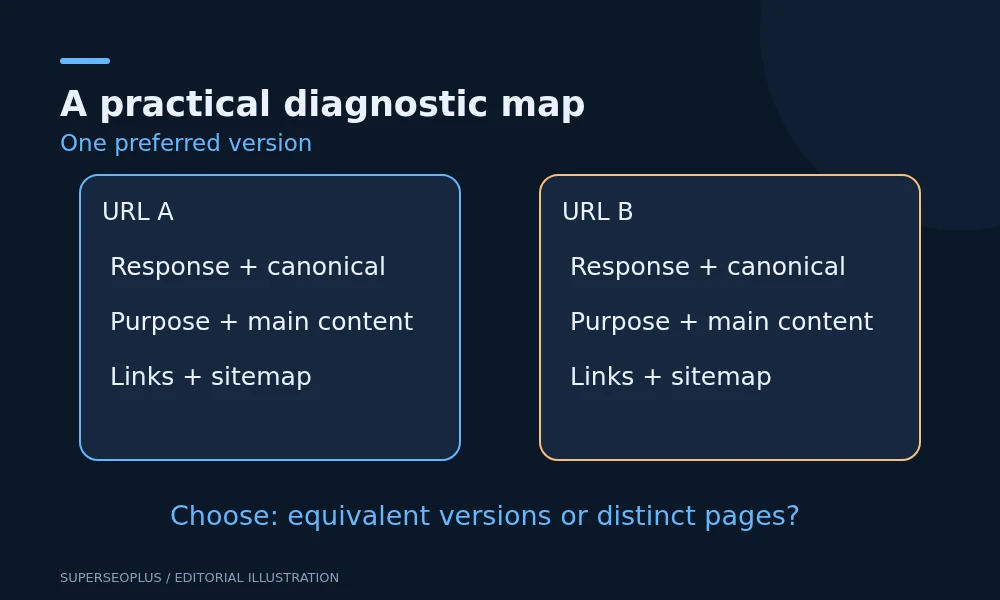
Inspect the affected URL in Search Console. Record the user-declared canonical, the Google-selected canonical where available, and the last crawl date. Open the selected URL separately.
Before editing, complete this sentence: “People searching for this information should land on ___ because ___.” The reason should concern the user’s task, rather than a preference for having more indexed pages.
If a tracking URL is represented by the clean version of the same page, that may be the intended outcome. If an important service page is represented by a different service, or a live page points to a staging hostname, investigate further.
Compare the pages in a fixed order
Use this worksheet for each URL where Google chose a different canonical. Save observations rather than simply marking everything “SEO checked”.
- Response: does it load directly, redirect, require login or show an error?
- Public canonical: what exact address does the HTML or HTTP header declare?
- Indexing permission: is the intended page excluded by a robots meta tag or response header?
- Main purpose: what distinct question or service does the page address?
- Navigation: which version do important internal links use?
- Sitemap: which preferred URL is listed?
Google documents canonical signals and their relative strength. Redirects and canonical annotations are strong signals; sitemap inclusion is weaker. Aligning signals is more coherent than telling Google different things in different places.
Choose the appropriate repair path
The URLs are alternatives for the same content
Choose the stable, public version you want visitors to use. Update internal references to that version. Where an old URL has permanently moved, a suitable redirect may be appropriate; where an alternative must remain accessible, a canonical annotation may be appropriate.
Check with the developer before redirecting parameter URLs. Some parameters change meaningful content or are necessary for forms, filters and purchasing. A rule that removes every query string can break those functions.
The pages should serve different purposes
Review their main content side by side. Merely changing titles and canonical fields does not create two useful resources. Clarify the different service scope, audience or task, and provide the detail needed for each.
Illustration: an emergency plumbing page and a planned bathroom installation page may deserve separate results. If both currently show the same generic plumbing introduction, the work is to explain their different processes, availability and customer decisions. Do not fabricate emergency availability or project evidence.
A template points pages to the wrong destination
Check several pages sharing the template. If each points to the homepage or a staging domain, ask the developer to investigate the source of that output. Fixing one article’s field may conceal a template problem without resolving it for other pages.
In Rank Math, check the page’s advanced canonical setting when available. A blank custom field normally allows the plugin’s default behaviour; do not fill every field simply for the sake of it. Verify the generated source after any approved change.
The SEO audit checklist provides a useful way to record the affected URLs, evidence and repair priority alongside other findings.
Check for competing canonical declarations
View the public page source and search for canonical. Inspect response headers if your developer suspects a header-level declaration. A theme, another SEO component or custom code may be producing additional output.
Where Google chose a different canonical because of a template fault, the goal is a clear, consistent preference. Ask the developer to identify the responsible component rather than adding another tag to counteract an existing one. Keep the initial HTML and any rendered output consistent where possible.
Google’s canonical troubleshooting guidance also covers less common causes such as unintended cross-domain output. A strange external canonical warrants a security and configuration review, but it is not by itself proof of compromise.
Take care with UK and US versions
Two English-language pages aimed at different countries can still be very similar. Decide whether separate versions give users meaningful differences, such as actual availability, delivery conditions or currency. Do not manufacture separate country pages solely by swapping place names.
Where regional versions are justified, review canonical and hreflang implementation together using Google’s international guidance. A canonical choice and a regional targeting annotation address different questions; neither should be applied mechanically.
Verify the public repair and Google’s later decision
Once you have repaired the reason Google chose a different canonical, first verify what you control: each intended URL returns the expected content, canonical declarations agree, and important internal links and sitemap entries use the preferred addresses. Record the date.
Then monitor a later crawl to see whether Google chose a different canonical again, and compare the Google-selected canonical in URL Inspection. A live test that fetches successfully is not a confirmation of Google’s canonical decision. If Search Console still shows an older crawl, it has not yet supplied evidence about your new output.
Do not use the URL removal tool to force canonical selection or block duplicates in robots.txt as a shortcut. Review Google’s documented methods and preserve legitimate visitor access.
Common questions
Is it always a problem when Google chose a different canonical?
No. Normal websites have URL variations. Concentrate on cases where the selected page is unsuitable or important content is being represented incorrectly.
Will a self-referencing canonical force indexing?
No. It states a preference. Google still evaluates the content and other signals.
Should I redirect all affected pages to the homepage?
No. Use an appropriate equivalent destination where a redirect is justified. A blanket homepage redirect usually fails to preserve the original user task.
For wider checks, use our technical SEO checklist. For a complex migration or repeated cross-template conflict, a technical SEO review can turn the comparison worksheet into a repair plan.
SuperSEOPlus Editorial is the editorial byline for articles published on SuperSEOPlus. It is a publication byline, not an individual author. The guides cover SEO, local SEO, link building, content marketing, WordPress and digital marketing, and aim to explain how these topics work in practical terms. Where an article recommends third-party tools or products, any affiliate relationship is disclosed in the article. We do not guarantee rankings, traffic or income.
About us and this blog
We are a digital marketing company with a focus on helping our customers achieve great results across several key areas.
Request a free quote
We offer professional SEO services that help websites increase their organic search score drastically in order to compete for the highest rankings even when it comes to highly competitive keywords.
More from our blog
See all posts


Recent Posts
- Duplicate Title Tags in WordPress: Identify Which Problem You Have November 7, 2026
- Sitemap Couldn’t Fetch in WordPress: Find the Failing Request November 5, 2026
- Google Chose a Different Canonical: A WordPress Comparison Checklist November 3, 2026