Discovered, Currently Not Indexed: What to Check Before Resubmitting
- November 1, 2026
- SEO Guides
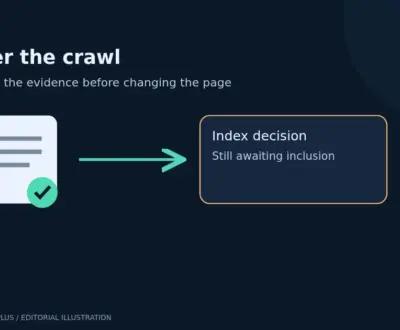
“Discovered, currently not indexed” means Google knows a URL exists but has not yet crawled it for indexing. Check whether the delay affects one page or an entire section, make important pages easy to reach, and investigate access or server problems where there is evidence. Repeated submission is not a dependable solution.
This is a pre-crawl investigation. If URL Inspection reports a completed crawl and a different exclusion reason, follow that reason instead. Do not assume every unindexed WordPress post has the same problem.
Find the pattern before changing settings
Choose a small sample: an affected important page, another affected page using the same template, and a comparable page that is indexed. Record their publication dates, index states and sitemap locations.
Then ask whether the discovered, currently not indexed URLs share a directory, template, publication period or source of internal links. This makes it easier to distinguish a discovery and prioritisation problem from a wider availability problem.
- One newly published page: check its public availability and links first.
- Many new pages from one template: inspect the template and whether the pages have distinct purposes.
- Older important pages across several sections: review Search Console crawl and host information, recent outages and site changes.
- Large numbers of parameter URLs: establish whether they should exist as separate search results.
Google’s community explanation of this status distinguishes crawl capacity from Google’s prioritisation of what to crawl. It is community guidance, rather than a promise about how an individual URL will be treated.
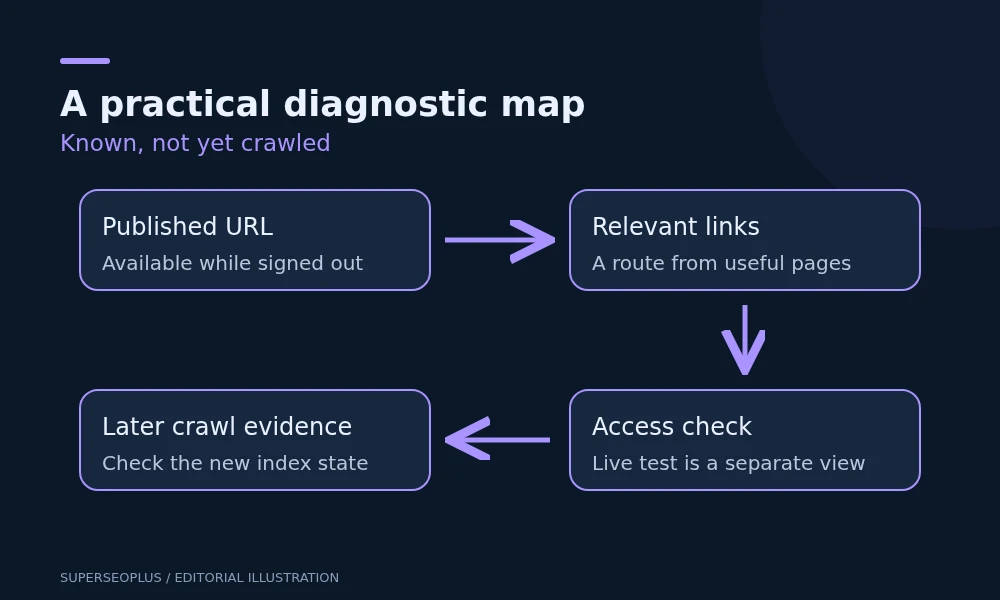
Check a real route to the page
Visit the site while signed out. Start from a relevant category or guide and follow links to the affected page. Record the route in plain language, such as “homepage → services → specialist service”.
If the only route requires submitting a search form, selecting a filter or clicking a script-only control, inspect whether a normal crawlable link also exists. A crawler and a visitor should have a straightforward way to find important content.
Check that the destination is the final published URL. A link to a draft preview, an old slug or a URL that redirects elsewhere is a poor route to the intended page. Sitemap inclusion does not repair those links.
Confirm that the public URL is the one you intended
Check the WordPress post status, the browser address after loading it and the main content. A scheduled post is not expected to be publicly available before its publication time. A draft preview accessible to an administrator is not proof of public access.
For a published page, use URL Inspection’s live test to check current availability. Keep the distinction clear: a live test can reveal an access problem now, but it does not show that Google has performed a normal indexing crawl or decided to index the URL.
If the page redirects to another URL, inspect the destination. If it is marked noindex, confirm whether that exclusion is intentional before changing anything. Do not remove exclusions from private or utility pages just to make a report look cleaner.
Review the sitemap as a discovery aid
Open the sitemap generated by your active WordPress configuration and find the exact preferred URL. Check the relevant child sitemap when the first file is an index. Confirm that the listed URL is published and does not redirect.
If the file cannot be read, resolve that separate sitemap problem. If it works, do not keep replacing it simply because some listed pages are not indexed. Google’s recrawl guidance describes sitemaps as a way to communicate many URLs, without guaranteeing inclusion.
Our guide to search engine submission explains the role of submission alongside normal discovery.
Use the technical SEO checklist to check whether the waiting URLs share a wider access or site-structure problem before changing infrastructure.
Investigate crawl capacity only when the evidence points there
Review Search Console’s Crawl stats and host information if delays affect many important URLs. Compare the timing with known downtime, slow responses or repeated server errors. Ask the hosting provider for relevant request logs when necessary.
A useful escalation says which URLs were affected, when the problem occurred and what responses were recorded. A generic “increase crawl budget” request does not identify an actionable repair.
Do not move hosts, alter caching or increase server resources solely because this status appears. On a small site, a handful of waiting pages does not establish a capacity shortage. More infrastructure cannot make near-identical pages more useful.
Prioritise a useful sample instead of bulk resubmission
Illustrative scenario: a company publishes 40 location pages at once. The pages differ mainly by town name, and the services menu links only to the original regional page. Most new URLs remain discovered but not indexed.
A sensible first step is to select the few locations the company genuinely serves with distinct information, improve their content and navigation, and monitor that sample. Generating another 40 pages would make it harder to evaluate whether the original set helps customers.
For each discovered, currently not indexed URL you work on, record one hypothesis for each change. For example, “This important page had no contextual link” is testable. Changing links, templates, hosting and copy simultaneously obscures what happened.
How to verify an improvement
After fixing a demonstrated problem, confirm that the published page remains accessible and the new links work. For a selected important URL, request indexing if appropriate. Keep a dated record and revisit URL Inspection later.
A new crawl date shows that a discovered, currently not indexed URL has progressed beyond discovery. If the URL then moves to “crawled, currently not indexed”, the crawl delay has changed into a different investigation; it has not automatically become a success. The outcome you ultimately want is the intended page indexed with appropriate content and canonical signals.
Questions that often lead to unnecessary work
Should I request indexing daily for discovered, currently not indexed URLs?
No. A repeated request does not give you a reliable diagnostic signal or a guarantee of faster processing. Use requests selectively after meaningful changes.
Should I use the Google Indexing API for ordinary blog posts?
Do not assume it is a general submission service. Use the supported Search Console and sitemap workflows for ordinary content, and check the API’s official eligibility rules before considering it.
How long should I wait?
There is no dependable deadline for an individual discovered, currently not indexed page. Review evidence of access and discovery rather than promising that a certain number of days will produce indexing.
If important pages stay waiting across several templates, bring the sample worksheet to a technical SEO specialist. It gives the investigation a clear starting point.
SuperSEOPlus Editorial is the editorial byline for articles published on SuperSEOPlus. It is a publication byline, not an individual author. The guides cover SEO, local SEO, link building, content marketing, WordPress and digital marketing, and aim to explain how these topics work in practical terms. Where an article recommends third-party tools or products, any affiliate relationship is disclosed in the article. We do not guarantee rankings, traffic or income.
About us and this blog
We are a digital marketing company with a focus on helping our customers achieve great results across several key areas.
Request a free quote
We offer professional SEO services that help websites increase their organic search score drastically in order to compete for the highest rankings even when it comes to highly competitive keywords.
More from our blog
See all posts



Recent Posts
- Duplicate Title Tags in WordPress: Identify Which Problem You Have November 7, 2026
- Sitemap Couldn’t Fetch in WordPress: Find the Failing Request November 5, 2026
- Google Chose a Different Canonical: A WordPress Comparison Checklist November 3, 2026