“Crawled, currently not indexed” means Google fetched a URL but has not included it in its index. To investigate a WordPress page, record the crawl date and index status, check what Google actually received, and compare the page with similar URLs. The status alone does not identify the cause or prove that your writing is poor.
Start with one important crawled, currently not indexed page rather than changing the whole website. This guide covers pages Google has already crawled. A URL still waiting for its first crawl needs a different investigation.
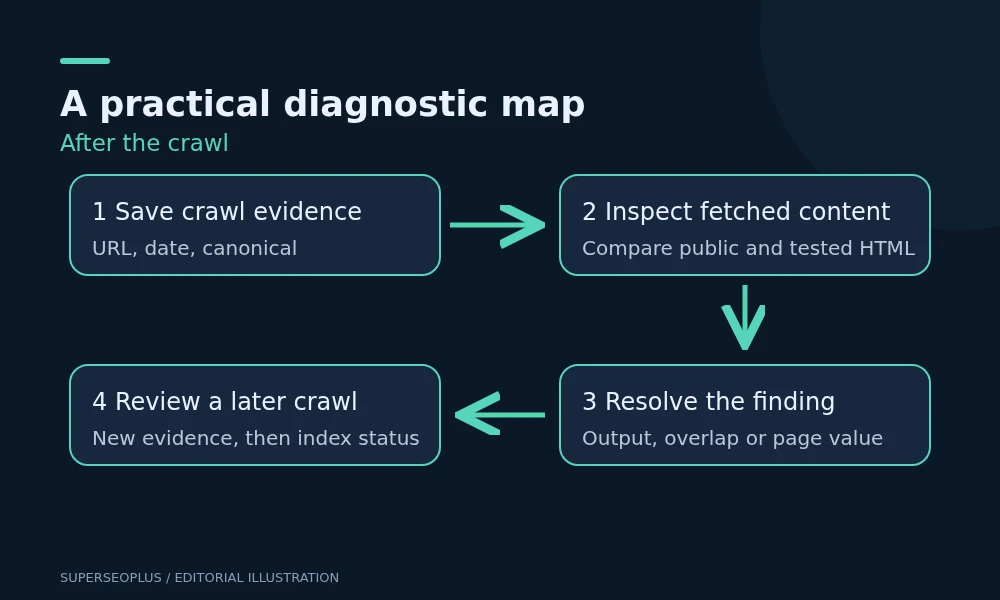
Save an evidence record before editing
In Search Console, select the property containing the full URL, then paste that URL into URL Inspection. Copy the indexed result into a short worksheet. Do this before running a live test, because the two views answer different questions.
- Exact inspected URL, including protocol, hostname and trailing slash.
- Index status and last crawl date.
- Whether fetching and indexing were allowed at that crawl.
- User-declared and Google-selected canonical, where available.
- Referring page and sitemap information, where reported.
- Date of the most recent meaningful page change.
If the crawl predates your repair, an old report cannot confirm that the repair failed. Keep the timestamp so you can recognise new evidence later. Conversely, repeatedly looking at a successful live test cannot establish that Google has accepted the page into the index.
Separate a retrieval problem from an evaluation problem
Run Test live URL. Where the tool provides tested-page HTML and a screenshot, inspect both. Look for the actual service description or article body, rather than just a successful response or a visible header.
For a WordPress service page, compare three things: the public page when signed out, the HTML Google tested, and the content you intended to publish. A page builder can display a convincing preview to an administrator while public visitors receive a maintenance notice, an empty template or a cached older version.
Record a concrete discrepancy if you find one. For example, “The public body contains only the navigation and contact footer” is useful evidence for a developer. “Google dislikes my site” is not a diagnosis.
What different observations suggest
- Main content absent: investigate rendering, templates or access restrictions with the developer.
- Current page redirects or returns an error: repair the current URL problem before evaluating content.
- Content present but another canonical is selected: compare the two pages and their URL signals.
- Content present, accessible and distinct: review usefulness and the page’s role in the site.
Google’s Page indexing report documentation explains that live tests do not test every indexing condition, including canonical and duplicate decisions. A successful fetch therefore narrows the investigation without closing it.
Test whether this page deserves a separate result
Open the closest existing page on your own site beside the affected page. Ask what a visitor can accomplish on one that they cannot accomplish on the other. A city name or a rewritten introduction may not create a meaningful distinction if both pages offer the same information and next step.
For a service page, useful differentiation might include a genuinely different service scope, eligibility, delivery process, limitations, examples of the work or clear information about who it serves. Add only facts you can substantiate. Do not invent projects, customer results or local offices to make a page look distinctive.
If two pages serve the same purpose, plan a consolidation review rather than expanding both with filler. If they serve different purposes, make that difference apparent in the main content and navigation. A self-referencing canonical is not a substitute for a distinct purpose.
For the distinction between discovery, submission and indexing, see our guide to search engine submission. It explains why finding a URL does not guarantee inclusion.
Check how people reach the page
Start at your homepage or a relevant published guide and try to reach the affected page through ordinary links. Check whether the anchor accurately describes it and whether the link reaches the preferred URL directly.
A crawled, currently not indexed page that appears only in a sitemap may have little context for visitors. Add a relevant contextual link where it improves an existing journey, with the site owner’s approval when editing published material. Do not add sitewide keyword links simply to make a crawler visit more often.
Use the technical SEO checklist to review broader crawlability problems. Keep this investigation focused on the affected page and a small sample of similar pages.
A worked diagnostic example
Illustration, not a client case study: a business has separate “office cleaning” and “commercial cleaning” pages. Both describe the same services with nearly identical text. The owner sees the second page listed as crawled, currently not indexed.
The live test contains the full text, so missing HTML is not demonstrated. The next useful task is to compare purpose and content, then decide whether to build a genuinely distinct office-specific resource or consolidate the overlap. Replacing the sitemap or requesting indexing every morning would not resolve that editorial decision.
Verify progress after a substantive repair
Save the new page version and change date. Check the public output again, then use an indexing request for an important repaired URL if appropriate. Google says repeated requests do not speed up crawling, and inclusion is not guaranteed.
On the next review of a page that was crawled, currently not indexed, look for a crawl after your change, the expected content and canonical, and an updated indexing decision. A smaller count in a report is not enough: URLs can move into another exclusion category. Inspect the actual page.
Common follow-up questions
Should I delete every crawled, currently not indexed URL?
No. Review purpose, business value and duplication first. A useful service page deserves investigation; a disposable duplicate may need a different treatment. Preserve important URLs until you have a justified plan.
Will making the article longer fix indexing?
Extra length does not demonstrate usefulness. Add missing answers, evidence or practical detail where readers need them. Remove repetition rather than expanding it.
Does indexing mean the page will get traffic?
No. Indexing makes a page eligible to appear; it still needs relevance and competitiveness for searches people make.
If an important page remains excluded, prepare the worksheet, tested HTML and comparison URLs for a technical SEO review. Those records make the next investigation specific and repeatable.
SuperSEOPlus Editorial is the editorial byline for articles published on SuperSEOPlus. It is a publication byline, not an individual author. The guides cover SEO, local SEO, link building, content marketing, WordPress and digital marketing, and aim to explain how these topics work in practical terms. Where an article recommends third-party tools or products, any affiliate relationship is disclosed in the article. We do not guarantee rankings, traffic or income.
About us and this blog
We are a digital marketing company with a focus on helping our customers achieve great results across several key areas.
Request a free quote
We offer professional SEO services that help websites increase their organic search score drastically in order to compete for the highest rankings even when it comes to highly competitive keywords.
More from our blog
See all posts



Recent Posts
- Duplicate Title Tags in WordPress: Identify Which Problem You Have November 7, 2026
- Sitemap Couldn’t Fetch in WordPress: Find the Failing Request November 5, 2026
- Google Chose a Different Canonical: A WordPress Comparison Checklist November 3, 2026