Blocked by Robots.txt After a Fix? Check the Exact URL and Response
- November 11, 2026
- Wordpress
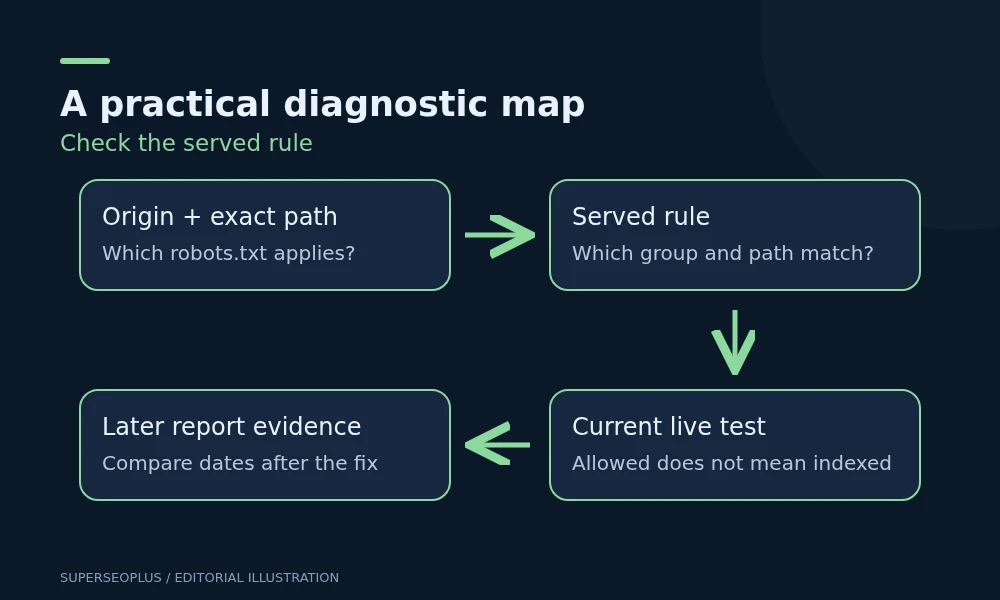
If Search Console still reports “Blocked by robots.txt” after a WordPress fix, compare the exact URL, the currently served rules and the date of Google’s evidence. The setting you edited may not control the response Google receives, or the report may describe an earlier crawl.
When a page is blocked by robots.txt, do not remove every exclusion as a test. Some rules intentionally limit crawling of internal search results, account areas or other low-value paths. Find the specific rule and response responsible for the affected public page.
Copy the precise affected address
Record the full URL from Search Console, including HTTPS or HTTP, hostname, path and parameters. Open that address and note any redirect. A rule investigation for one hostname does not automatically explain another hostname.
Next, open /robots.txt on the relevant origin. For example, a page under https://shop.example.com/ needs its own origin checked, rather than assuming the file on https://example.com/ applies.
Save the file contents and check time. Compare these with the Search Console report and any live-test result. This creates a record you can use to distinguish a current rule from historical information.
Check the public response, not only the WordPress editor
WordPress may generate a virtual robots response, while a physical file, host configuration or cached response supplies something different publicly. A plugin editor shows the configuration it manages; it does not prove that response wins on the live request.
Open the file while signed out. If needed, ask the developer to capture the response status, headers and body. A login page, firewall challenge or server error is a separate availability issue, even if the browser address ends in robots.txt.
Illustration: an owner removes a broad exclusion from a plugin’s editor. The public file still contains it because a physical file is being served instead. Repeatedly changing the plugin field does not fix the served file. The developer needs to identify the source that actually answers the request.
Find which rule is blocked by robots.txt for the actual path and crawler
Read the user-agent group and path rules that apply to the affected crawler. A general group and a more specific group can make a quick visual check misleading. Ask a developer to evaluate the exact URL when wildcard matching or competing rules are involved.
Google’s robots.txt introduction describes the file as crawl access control. It is not a general permission switch for indexing or a secure way to protect private information.
Keep a short rule note: affected path, matching rule, intended behaviour and proposed change. “Remove the block for the public article path while retaining account exclusions” is reviewable. “Allow everything” usually hides the real decision.
Separate crawling from noindex
A page may be allowed by robots.txt and still contain a noindex instruction. It may also be blocked from crawling yet appear in search based on information found elsewhere.
Google’s noindex documentation explains that Google must be able to crawl a page to see its noindex instruction. Blocking the same page in robots.txt can prevent that instruction being read.
Choose your desired outcome first:
- Public page you want eligible for search: review crawl access, indexing instructions and the preferred URL.
- Public page you want excluded from search: use an appropriate indexing-control method and allow its instruction to be read.
- Private information: use authentication or another genuine access control, rather than relying on crawler rules.
Do not copy a noindex-and-disallow combination from a forum without understanding how the two controls interact.
Check the WordPress visibility setting in context
Review Settings → Reading and the “Discourage search engines” setting if the problem affects the whole public site. Also inspect the individual page’s SEO settings and public output where relevant.
These checks answer different questions. The Reading setting, a page-level noindex field and a robots file are not interchangeable. A setting being correct does not establish that every other layer is correct.
If a developer changes how robots.txt is served, retain the previous response and use a controlled repair. Avoid removing security controls, changing the server or disabling plugins merely because the origin of a rule is unclear.
Retest the repair using current evidence
After an approved change, reopen the exact public robots URL and compare its body with the intended version. Check the affected public page as a signed-out visitor, then use URL Inspection’s live test to assess current crawl access.
Record the repair date and the test result. Later, compare the report’s evidence date with that repair. If Search Console still shows the earlier state, wait for updated evidence rather than making unrelated edits.
A live test showing a page is no longer blocked by robots.txt confirms a narrower point than indexing. Google still needs to evaluate the page and may choose not to include it. Monitor the URL’s later indexing state separately.
Our guide to search engine submission separates discovery from indexing, which helps explain why removing a crawl block is only one part of the process.
What to send to your developer or host
- The exact affected URL and any redirect destination.
- The origin’s public robots URL and a saved copy of its current body.
- The reported blocking reason and available dates.
- The live-test outcome.
- The matching rule you suspect and the intended behaviour.
- The date and location of the setting already changed.
That evidence helps distinguish a configuration source problem from caching, a path-matching issue or stale reporting.
Common follow-up questions
Should I delete robots.txt?
Not as a first step. Establish what the rules do and preserve legitimate exclusions. Deletion may remove useful crawl controls while leaving the actual problem elsewhere.
Does “allowed” mean the page must be indexed?
No. Once a URL is no longer blocked by robots.txt, crawl permission removes one possible obstacle. It does not establish usefulness, canonical selection or inclusion.
Can a page blocked by robots.txt explain all lost traffic?
Only if evidence connects the affected paths and timing with the loss. Do not treat one warning as an explanation for every ranking change.
Continue with the technical SEO checklist if several controls are involved. A technical SEO review can help reconcile the served response with the intended configuration.
SuperSEOPlus Editorial is the editorial byline for articles published on SuperSEOPlus. It is a publication byline, not an individual author. The guides cover SEO, local SEO, link building, content marketing, WordPress and digital marketing, and aim to explain how these topics work in practical terms. Where an article recommends third-party tools or products, any affiliate relationship is disclosed in the article. We do not guarantee rankings, traffic or income.
About us and this blog
We are a digital marketing company with a focus on helping our customers achieve great results across several key areas.
Request a free quote
We offer professional SEO services that help websites increase their organic search score drastically in order to compete for the highest rankings even when it comes to highly competitive keywords.
More from our blog
See all posts


Recent Posts
- Blocked by Robots.txt After a Fix? Check the Exact URL and Response November 11, 2026
- WordPress Redirect Chains: Build a Safe URL Repair Map November 9, 2026
- Duplicate Title Tags in WordPress: Identify Which Problem You Have November 7, 2026