

WordPress Website Design: 10 Powerful Tips & Complete Guide
- September 20, 2026
- Wordpress
In practice, effective WordPress website design involves much more than choosing colours and arranging blocks on a page. A business website needs to explain what you offer, work properly across different screen sizes, make important information easy to find, provide clear ways to contact you, and give search engines a structure they can understand.
WordPress remains one of the world's most widely used website platforms. Its flexibility allows it to support everything from straightforward business websites and blogs to ecommerce stores and more complex projects.
This guide explains what professional WordPress website design involves, what business owners should prepare before starting a project, what affects the cost, and what to look for when choosing a WordPress designer or developer.
Need a professional WordPress website? View my WordPress website design service on Fiverr.
What Is WordPress Website Design?
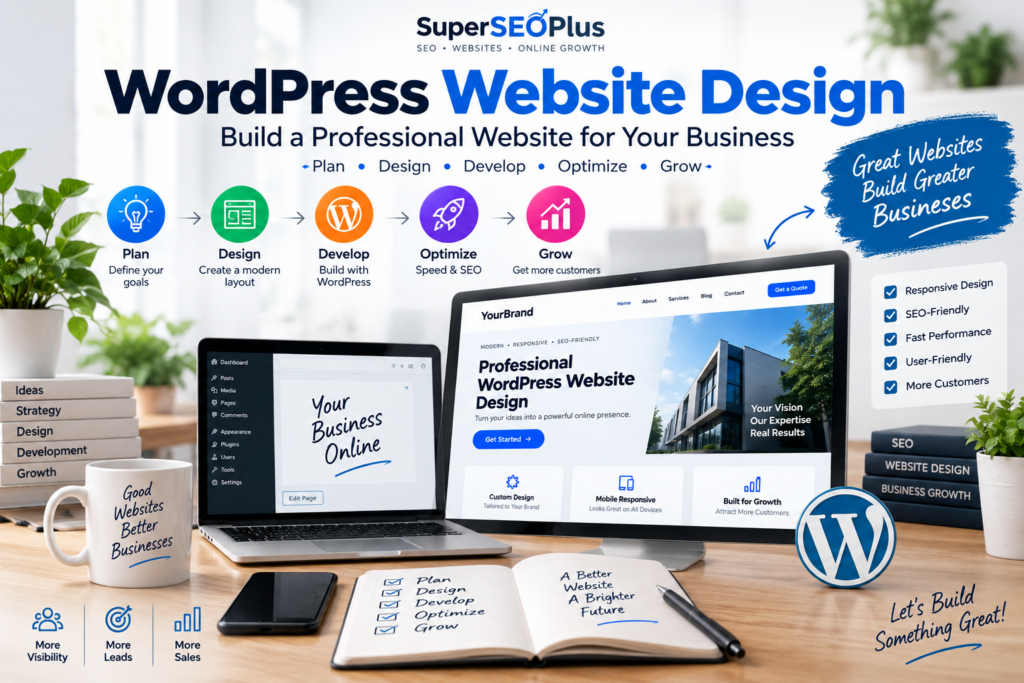
A practical WordPress website design process, from planning and design to development, optimization and growth.
WordPress website design is the process of planning, creating and organising a website using WordPress as its content management system.
The design process includes the visual appearance of the site, but that is only one part of the job. A professional project also considers page structure, navigation, mobile responsiveness, content presentation, calls to action, forms, performance, usability and the technical foundation needed for search visibility.
This distinction matters because installing WordPress is not the same as designing an effective business website.
A basic installation gives you the software. The design and development process turns that software into a website that represents a particular business and helps visitors accomplish what they came to do.
For a service company, that might mean understanding its services and requesting a quote. For a restaurant, visitors may want to see the menu, location and opening information. For a consultant, the priority could be establishing expertise and making it easy for prospective clients to get in touch.
Good WordPress web design therefore starts with the purpose of the website rather than with a template.
Why Do Businesses Choose WordPress?
There is no single website platform that is right for every project. WordPress remains popular, however, because it combines flexibility with a large ecosystem of themes, plugins and development resources.
According to WordPress.org, the platform is used for projects ranging from simple websites and blogs to complex portals, enterprise websites and applications.
Several characteristics make it particularly practical for business websites.
Content can be managed without rebuilding the site
Once a website is properly configured, business owners or their teams can usually update text, publish blog posts, replace images and make routine content changes through the WordPress dashboard.
This can reduce dependence on a developer for every small update.
It can grow with the business
A company might initially need only a homepage, services page, about page and contact page. Later, it may want to add a blog, additional service pages, landing pages, booking functionality or ecommerce.
WordPress can accommodate many of these changes without requiring the entire website to be rebuilt on another platform.
There is a large ecosystem of extensions
Plugins can add functionality such as contact forms, analytics integrations, ecommerce, security tools, caching, backups and SEO controls.
The important point is not to install as many plugins as possible. Each addition should solve a genuine requirement and be maintained appropriately.
WordPress can provide a solid SEO foundation
WordPress does not automatically make a website rank in Google. No CMS can guarantee that.
It does, however, provide the flexibility needed to create logical URLs, useful page structures, headings, metadata, internal links, optimised images and substantial written content. Those elements make it suitable for businesses that intend to invest in organic search.
Need a Professional WordPress Website?
If you would prefer to have the design and technical setup handled for you, I provide professional WordPress website design for businesses, including responsive layouts, contact forms, Google Maps integration, essential plugins, content upload, basic on-page SEO setup and speed optimisation.
What Should a Professional WordPress Website Include?
The exact requirements vary by business, but most professional business websites share several fundamentals.
1. Clear navigation
A visitor should be able to understand the structure of your website without having to figure out where information has been hidden.
For many small businesses, straightforward navigation works best:
- Home
- About
- Services
- Blog or Resources
- Contact
Businesses offering several distinct services may benefit from individual service pages rather than placing everything on one long page.
2. Responsive design
A responsive website adapts to different screen sizes rather than simply shrinking the desktop version.
Text needs to remain readable, navigation should work comfortably on smaller screens, buttons should be easy to use, forms should fit the display, and important information should not disappear on mobile devices.
Responsive design should therefore be considered from the beginning rather than treated as a final adjustment.
3. A clear explanation of the business
Design cannot compensate for unclear messaging.
A new visitor should quickly be able to determine:
- What does this business do?
- Who does it help?
- What services are available?
- Why should someone continue reading?
- What should the visitor do next?
A beautiful homepage that leaves visitors wondering what the company actually offers has failed at one of its most important jobs.
4. Useful calls to action
Calls to action should correspond to the purpose of the page.
Examples include:
- Request a quote
- Book a consultation
- Send an enquiry
- Call the business
- View a service
- Purchase a product
- Download a resource
Not every section needs a large button, but visitors should never have to search for a way to take the next logical step.
5. Contact forms and business information
A business website should make communication straightforward.
Depending on the company, this may involve a contact form, telephone number, email address, physical location, Google Maps integration or links to relevant social profiles.
6. Fast, practical page design
Large images, unnecessary animations, poorly configured plugins and oversized scripts can make an otherwise attractive website frustrating to use.
Performance should be considered during development rather than postponed until the website becomes noticeably slow.
7. Search-friendly structure
A professional website should have a logical hierarchy of pages and headings, descriptive URLs where appropriate, useful internal links and content that accurately explains each page.
This does not guarantee rankings. It simply avoids building unnecessary obstacles into the site before SEO work even begins.
WordPress Website Design for Small Businesses
Small businesses often do not need complicated websites. They need websites that perform a few important jobs extremely well.
A typical small business website should establish credibility, explain the services offered, answer common questions, provide evidence where appropriate, and make contacting the company simple.
For example, a local service provider may need:
- A strong homepage
- An about page
- Individual service pages
- A contact page
- Location information
- A map
- Customer enquiries through a form
- Basic analytics
- A blog or resources section if content marketing is part of the strategy
Adding features simply because they are available can make a small-business site harder to maintain. The better question is: What does the customer need to accomplish on this website?
How Many Pages Does a Business Website Need?
There is no ideal page count that applies to every business.
The right number depends on the company's services, audience, content strategy and objectives.
| Website Size | Suitable For | Typical Structure |
|---|---|---|
| One-page website | Simple businesses, individual services, early-stage projects | Introduction, services, about, contact and CTA on one page |
| Small multi-page website | Established small businesses and professional services | Home, About, Services, Contact plus supporting pages |
| Larger business website | Businesses with several services, locations or content requirements | Multiple service pages, resources, landing pages, team or location pages |
| Ecommerce website | Businesses selling online | Product categories, product pages, cart, checkout and supporting content |
A common mistake is assuming that fewer pages are automatically better. If two services satisfy different search intents and need substantially different information, giving each service its own useful page can make the website clearer for visitors and search engines.
The opposite mistake is creating dozens of nearly identical pages simply to target keyword variations. Each page should have a genuine reason to exist.
What Does WordPress Website Design Cost?
There is no meaningful universal price for a WordPress website because the amount of work can vary dramatically.
A focused one-page business site and a ten-page site with custom functionality are different projects.
Factors that commonly influence WordPress website design cost include:
- Number of pages
- Complexity of the design
- Whether the site is new or a redesign
- Amount of content to upload
- Custom functionality
- Ecommerce requirements
- Forms and integrations
- Image preparation
- SEO requirements
- Performance optimisation
- Revision requirements
- Hosting or migration work
- Ongoing maintenance requirements
When comparing quotes, compare the scope rather than the headline price alone.
A cheaper proposal may exclude important work that another proposal includes. Equally, a small business should not pay for functionality it does not need.
The best starting point is a clearly defined project brief.
WordPress Designer vs WordPress Developer: What's the Difference?
The terms WordPress designer and WordPress developer are often used interchangeably, but they can describe different areas of work.
| WordPress Designer | WordPress Developer |
|---|---|
| Focuses heavily on visual layout and user experience | Focuses heavily on technical implementation and functionality |
| Works with typography, spacing, colours and page layouts | May work with themes, plugins, code and integrations |
| Structures information visually | Handles technical requirements behind the interface |
| May use page builders or block-based tools | May customise or extend WordPress functionality |
For many small-business projects, one WordPress professional handles aspects of both roles.
What matters more than the job title is whether the person can deliver the actual requirements of your project.
DIY vs Freelancer vs Agency: Which Approach Fits Your Project?
There are three common ways to build a business WordPress website: do it yourself, hire a freelancer, or work with an agency.
None is automatically right for every business.
Building the website yourself
A DIY approach can make sense when the budget is limited and you are comfortable learning WordPress.
The main cost is often time. You need to learn the platform, select suitable tools, structure the pages, prepare the content, solve technical issues and test the finished website.
Hiring a WordPress freelancer
A freelancer can be suitable when you want professional implementation without necessarily needing a large project team.
This can work particularly well for small and medium-sized business websites with a clearly defined scope.
If this matches what you are looking for, you can review my professional WordPress website design service on Fiverr to see the available project options.
Working with a web design agency
An agency can make sense for projects requiring several specialists, extensive strategy, custom development, large amounts of content or ongoing support across multiple disciplines.
The trade-off is usually a larger project scope and budget.
Compare the approaches
| Option | Potential Advantage | Main Consideration |
|---|---|---|
| DIY | Maximum direct control and lower service cost | Requires time and technical learning |
| Freelancer | Direct communication and professional implementation | Capabilities and availability vary by provider |
| Agency | Access to a broader team | Typically suited to larger scopes and budgets |
How to Choose a WordPress Website Designer or Developer
Choosing someone based entirely on price can create problems later. Before hiring a WordPress professional, look at the complete service.
Review what is actually included
Does the quote include responsive design? Content upload? Forms? Plugin setup? Performance work? Revisions?
Two proposals described as a “five-page WordPress website” may include very different amounts of work.
Look for clear communication
Website projects involve many small decisions. Good communication about requirements, responsibilities and limitations is therefore valuable.
You should know what you need to provide, what the developer will handle and what happens if the scope changes.
Confirm mobile responsiveness
Do not assume that a desktop design will automatically work well on mobile.
Ask whether the project is designed and tested for desktop, tablet and mobile layouts.
Ask about website ownership and access
Clarify who owns the domain, hosting account, WordPress installation and content when the project is finished.
For most independent business websites, the business should maintain appropriate access to its important digital assets.
Understand what “SEO included” actually means
This phrase can mean almost anything.
Basic SEO setup may include a sensible site structure, titles, headings and other on-page foundations. A complete SEO campaign can involve keyword research, content strategy, technical auditing, link acquisition, local SEO and months of ongoing work.
Ask exactly what is included instead of assuming that a website package includes an ongoing SEO campaign.
Questions to Ask Before Hiring a WordPress Developer
A short conversation before starting can prevent misunderstandings later.
Useful questions include:
- What exactly is included in the project?
- How many pages will be created?
- Will the website be responsive?
- Who provides the written content and images?
- Are contact forms and integrations included?
- Will I be able to update the website myself?
- What SEO work is included?
- Is speed optimisation included?
- How many revisions are included?
- What happens if I need additional functionality?
- Who handles hosting and the domain?
- What access will I receive after completion?
There is nothing wrong with a developer saying that something is outside the scope. Clear limitations are better than vague promises.
Why SEO Should Start During Website Development
Search engine optimisation is often treated as something that happens after a website launches.
That can create unnecessary work.
SEO does not require turning every paragraph into a collection of keywords. It starts with making the website understandable and useful.
Site architecture
The way pages are organised affects how visitors navigate the site and how search engines discover relationships between content.
A company offering several important services may need a central services page linking to detailed pages for each service.
URLs
Descriptive URLs can make the purpose of a page easier to understand.
For example:
example.com/wordpress-website-design/
communicates more than:
example.com/page?id=4827
Page titles and headings
Each important page should have a clear purpose reflected in its title and main heading.
Headings should then organise the content logically rather than being used simply to make text larger.
Internal linking
Internal links connect related pages and help visitors continue exploring useful information.
For example, a WordPress development article can naturally link to resources about technical SEO, website performance, local SEO or content strategy when those resources help answer the reader's next question.
Content planning
A website should be designed around the information customers need, not around empty template sections.
Planning important service pages before development can avoid situations where several unrelated services are squeezed onto a single generic page simply because that is how the template was structured.
Performance and mobile usability
Performance work is easier when considered throughout the build. Image sizes, themes, plugins, fonts, scripts and animations can all affect the final result.
The same principle applies to mobile design. Testing it during development is preferable to rebuilding sections after launch.
Common WordPress Website Design Mistakes
Many website problems are not dramatic technical failures. They are small decisions that collectively make a site less useful.
Choosing appearance over usability
Visual design matters, but visitors still need to read the content, understand the navigation and find important actions.
Using too many plugins
Plugins are useful, but installing several tools that perform overlapping jobs can make maintenance unnecessarily complicated.
Use plugins because the website needs their functionality, not because they appear on a generic “must-have plugins” list.
Ignoring mobile layouts
A section that looks excellent on a wide monitor can become awkward on a phone. Columns, typography, spacing, forms and navigation all need attention at smaller widths.
Using enormous images
Uploading a huge original photograph when the website displays it at a fraction of that size can add unnecessary page weight.
Images should be appropriately sized and compressed while maintaining suitable visual quality.
Making every page look like the homepage
Service pages have a different job from the homepage. They should provide enough detail for someone evaluating that particular service rather than repeating the same general company introduction.
Weak calls to action
If a visitor reaches the end of a service page and has no obvious way to enquire, the site is creating unnecessary friction.
Leaving SEO until everything is finished
Changing page architecture, URLs and content structure after launch can be more complicated than considering them during planning.
Installing analytics but never using it
Measurement is useful only if someone reviews the information. Analytics can help identify which pages attract visitors and how people interact with the site, but collecting data without reviewing it achieves very little.
WordPress Website Project Checklist
Preparing your materials before development starts can make the project considerably smoother.
Business information
- Business name
- Short business description
- Services or products
- Target audience
- Contact information
- Address where relevant
- Opening hours where relevant
Branding
- Logo
- Brand colours
- Preferred fonts if established
- Brand guidelines if available
Website structure
- Required pages
- Services that need individual pages
- Blog or resources requirements
- Legal pages
- Contact page
Content
- Page copy
- Images
- Team information
- Product or service descriptions
- Testimonials that you have permission to publish
- Frequently asked questions
Technical information
- Domain access
- Hosting information
- Existing WordPress access where applicable
- Required integrations
- Forms
- Analytics requirements
- Payment functionality where applicable
Design references
Providing examples of websites you like can be helpful, but explain why you like them.
Perhaps you prefer the navigation, typography, spacing, service-page layout or overall simplicity. This gives the designer more useful information than simply saying “make mine like this.”
Prefer to Have Your WordPress Website Built for You?
If you have reached this point and decided that you would rather focus on your business than spend time configuring WordPress yourself, professional help may be the more practical route.
My WordPress website design service is intended for businesses that need a clean, responsive and manageable online presence.
Depending on the project, the service can include:
- Professional WordPress design
- Responsive desktop, tablet and mobile layouts
- Business pages and content upload
- Contact forms
- Google Maps integration
- Social media integration
- Essential plugin installation
- Basic on-page SEO setup
- Speed optimisation
- An easy-to-manage WordPress dashboard
Projects can range from focused one-page business websites to larger multi-page WordPress sites. Custom requirements can be discussed before ordering.
Frequently Asked Questions About WordPress Website Design
Is WordPress suitable for a small business website?
Yes. WordPress can work well for small-business websites because it can support simple brochure-style sites as well as larger websites that grow over time. Whether it is the right choice depends on your requirements, budget and how you intend to manage the site.
Do I need hosting and a domain before hiring a WordPress developer?
You need a domain and hosting for a self-hosted WordPress website to go live, but they do not necessarily need to be purchased before the initial project discussion. If you already have them, tell your developer which provider you use.
How long does it take to design a WordPress website?
It depends on the scope. A small website with content ready can generally be completed faster than a large site requiring many pages, custom functionality, ecommerce or extensive revisions. Content preparation and client feedback can also affect the timeline.
Can an existing WordPress website be redesigned?
Yes. Existing WordPress websites can often be redesigned without changing the underlying CMS. The current theme, plugins, hosting environment, content and technical condition should be reviewed before deciding on the best approach.
Will a WordPress website work on mobile phones?
A properly implemented responsive WordPress design should adapt to desktop, tablet and mobile screens. Responsiveness depends on the theme, layouts, content and implementation, so it should be tested rather than assumed.
Does WordPress automatically rank well in Google?
No. WordPress is a content management system, not a ranking guarantee. Search visibility depends on many factors including content quality, relevance, technical accessibility, site structure, competition, authority and the overall search experience.
Is SEO included in WordPress website design?
That depends on the provider and project scope. A website package may include basic on-page SEO foundations without including a complete SEO campaign. Always ask what “SEO included” specifically covers.
Can I edit my WordPress website after it is built?
One of WordPress's advantages is that routine content can generally be managed through the administration dashboard. How easy specific sections are to edit depends on how the site has been built.
Should every business service have its own page?
Not necessarily. Important services that require substantial, distinct information often benefit from dedicated pages. Closely related minor services may be better grouped together. The structure should primarily make sense to users rather than being created solely around keywords.
Should I hire a freelancer or a web design agency?
It depends on the scope. Freelancers can be practical for clearly defined small and medium-sized projects, while agencies may be appropriate for larger projects requiring multiple specialists. Compare relevant experience, scope, communication, deliverables and cost rather than choosing solely by provider type.
Final Thoughts
A professional business website does not need to be complicated. It needs to be purposeful.
Good WordPress website design brings together clear content, sensible navigation, responsive layouts, appropriate functionality, performance and a search-friendly structure. The objective is not to add every feature available; it is to build a website that makes sense for the business and the people who use it.
Before starting a project, define the pages you need, prepare your content, identify the actions visitors should take and decide which functionality is genuinely important. Those decisions make the design process easier and usually produce a more coherent website.
If you would prefer professional assistance with the design and setup, you can view my WordPress website design service on Fiverr and send your requirements before ordering.
Editorial note: Website requirements vary by business and project. Features, timelines and deliverables should be confirmed before beginning development. References to SEO describe good website foundations and do not constitute a guarantee of search-engine rankings.
About us and this blog
We are a digital marketing company with a focus on helping our customers achieve great results across several key areas.
Request a free quote
We offer professional SEO services that help websites increase their organic search score drastically in order to compete for the highest rankings even when it comes to highly competitive keywords.
More from our blog
See all posts



Recent Posts
- WordPress Website Design: 10 Powerful Tips & Complete Guide September 20, 2026
- Local Citation Building Services: Costs, Benefits & How to Choose September 18, 2026
- Toxic Backlinks: Can Bad Links Hurt SEO in 2026? August 31, 2026

Pingback: Anchor Text SEO: Best Practices for Links in 2026
Pingback: Search Engine Submission in 2026: Is It Really Necessary?